Strategy Record
Strategy records are used to control calculations. Like all other records, Strategy records contain properties that describe what they do. While there are several Strategy records available within CCH Tagetik Supply Chain Planning, you can also create new types to fit your business needs.
Before implementation, Wolters Kluwer works with you to define default Strategy records according to how you want to manage inventory, which you can override once they are in CCH Tagetik Supply Chain Planning. Some records may have fixed fill rates or fixed terms. You may create Strategy records by supplier (lead-time uncertainty) or from a customer perspective rather than from your company perspective. You can create as many Strategy records as you require.
The following list of questions can help you determine appropriate strategies:
- Is there an economic factor (order quantity or cost to hold inventory)?
- How often do you want to place orders: weekly (day of week) or monthly (day of month)? Do you need to guarantee a fill rate, percentage of orders to be filled? Is there a safety stock requirement, minimum safety stock to hold (can be units or days)?
- Is there a specific quantity for each order (can be units or days)?
- Is there a maximum inventory to stock (must be in days)?
- Do you want to send the vendor consistent order amounts (smoothing horizon [must be in days])?
You can use these overrides in combination with each other. For example, orders need to be placed every Tuesday to guarantee 95% of orders are filled, but you do not want to order more than 60 days at a time.
You will need to fine-tune these records as you begin working in CCH Tagetik Supply Chain Planning. Try adjusting properties to see how your forecast is affected.
The following Strategy record types are pre-defined and available in CCH Tagetik Supply Chain Planning:
Strategy Record Types
| Record Type | Description |
|---|---|
| Inventory EOQROL (economic order quantity re-order level) | Order quantity that minimizes the total holding and order costs; cost to hold the item versus the cost to the business if the item is out of stock. |
| Inventory Intermittent | No scheduled pattern for ordering; based on demand. |
| Inventory MTO | Make to Order has no scheduled pattern for ordering; based on demand. |
| Inventory Periodic | Orders placed weekly or monthly, for example. |
You apply Strategy records in the Inventory section of records.
Strategy Records in the Inventory Section 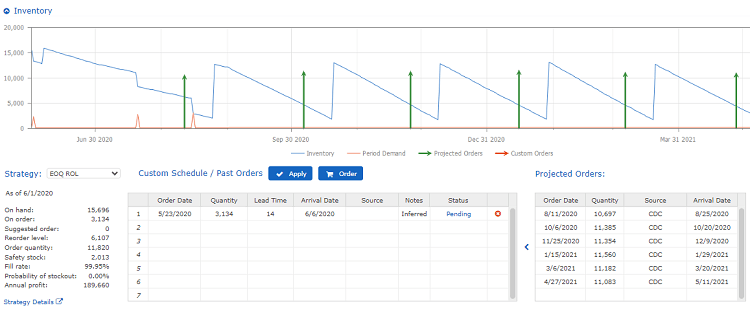
Warning: Edit Strategy records with care since any change you make to a Strategy record affects every record to which it is applied.
Note: If an invalid entry is entered in the Strategy table, an Error message displays and it either corrects it (for example, adds a zero where a space had been entered) or it lets you know what is invalid so you can correct it (for example, if text had been put in the date column, it will tell you to fix it).
To view and edit Strategy records
-
Do one of the following:
-
To view the strategy for a specific record, in the Inventory section of the record, click Strategy Details.
-
(Administrator only) To view all available Strategy Records
- On the Dashboard, in the left pane, click Administration > Forecast Database.
- In the Item column list, click Strategies and click OK.
- In the record, set the following parameters depending on the record type:
-
Inventory EOQ ROL
See Inventory EOQ ROL Record. - Inventory Intermittent
See Inventory Intermittent Record. - Inventory MTO
See Inventory MTO Record. - Inventory Periodic
See Inventory Periodic Record. 3. To save the record locally, in the upper-right of the screen, click OK. 4. To save the record to the database, on the menu (
 ), click Save All Changes.
See also Multiple Sources of Inventory