CAGR Record
CAGR (compound annual growth rate) records forecast the year-over-year growth rate of an investment or product over a specific period. The compound annual growth rate is calculated by taking the nth root of the total percentage growth rate, where n is the number of years in the period being evaluated.
You can specify a date on which to begin adjusting your forecast with a value (positive or negative) that you specify. For example, you may want to see what your forecast looks like with a 10% monthly growth rate.
CAGR records can contain some or all of the following sections:
- Historical data section
See Add Historical Data to Records. - CAGR section - Analysis Section - Comparable Items section
See Supplement Historical Data with Comparable Data. - Adjustments and Overrides Section - Monte Carlo Simulation section
To configure CAGR records
-
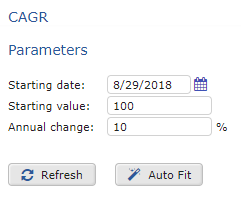
In the CAGR section, set the following parameters:
-
Starting date
- Starting value
- Annual change
CAGR Record Parameters
 2. Select one of the following:
CAGR Record Setup Options
| Option | Procedure |
|---|---|
| Refresh | Apply the configuration to the forecast. |
| Auto Fit | If you have enough historical data, click AutoFit to apply the CAGR parameters automatically. |
| 3. In the upper-right of the screen, click OK. | |
| 4. To save your changes to the database, on the menu, click Save All Changes. |