Opinion Line Record
Opinion Line records let users who do not own records add opinions without affecting records. They are similar to Data Entry records.
You can apply overrides at multiple levels and they roll up to the level you are viewing (similar to Roll Up records, which are based on top-down filters).
See Roll Up Record.
For example, a typical workflow that sales managers may follow is to add opinions, approve the plan, and review the opinions with demand planners. You can save multiple versions of an Opinion Line record by saving the record using different record names.
The Opinion Line roll up is dynamic; adjustments evolve as the system data changes. Enter opinions as overrides rather than adjustments as the roll up is dynamic; the adjustments apply to the roll up.
Opinion Line records can contain some or all of the following sections:
- Bill of Materials section
See BOM Part Record in Classic Mode. - Opinion Line section - Analysis Section - Adjustments and Overrides Section - Monte Carlo Simulation section
To configure an Opinion Line record
In the record properties, in the Top-down adjustment list, select one of the following:
Top-down Adjust Options for an Opinion Line Record
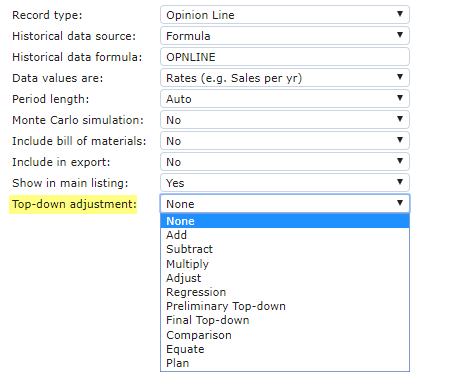
Top-down Adjustment Setup Options for an Opinion Line Record
| Option | Description |
|---|---|
| None | Opinion line does not appear as a comparison in child records. |
| Comparison | Opinion line appears in all child records (apportioned by record) as a comparison. The owner of the Opinion Line record appears in child records in parentheses. |
| Equate | Child records are adjusted to match the opinion line. |