Capex Record
Capex records let you plan capital expenditures by asset type. The outcome creates two data streams:
- Depreciation schedule
- Asset value
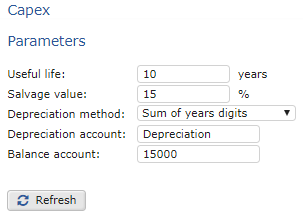
Capex Record Parameters
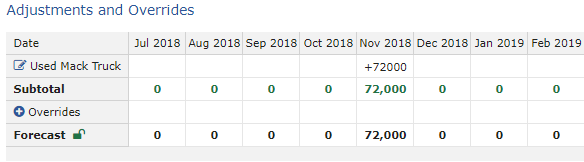
Capex Record Used in the Adjustments and Overrides Table
To configure a Capex record
- In the Capex section, under Parameters, do the following:
Capex Record Setup Options
| Option | Procedure |
|---|---|
| Useful life | Type the number of years the asset will remain in service. |
| Salvage value | Type the estimated resale value of the asset when it reaches the end of its useful life. |
| Depreciation method | Select one of the following: - Straight-line - Double declining balance - Sum of years digits |
| Depreciation account | Type the name of the account that maps to the depreciation schedule. |
| Balance account | Type the name of the account that maps to the asset value. |
| 2. Click Refresh to apply the parameters. | |
| 3. In the Adjustments and Overrides section, add or edit any assets as needed. |
Adjustments and Overrides Section 4. When you are finished, click Save to apply your changes.