Employee Record
Employee records are driver-based templates that let you plan all employee-related benefits and taxes. For example, you can set a Social Security global driver for all US employees, which populates the Social Security amount in the general ledger.
Some of the accounts in Employee records are driver-based (401K matching, for example) while others are inputs (Employee salary, for example). The columns in Employee record tables are fixed. Following are examples of Employee records for a US-based and an Australia-based employee.
Employee Table Record
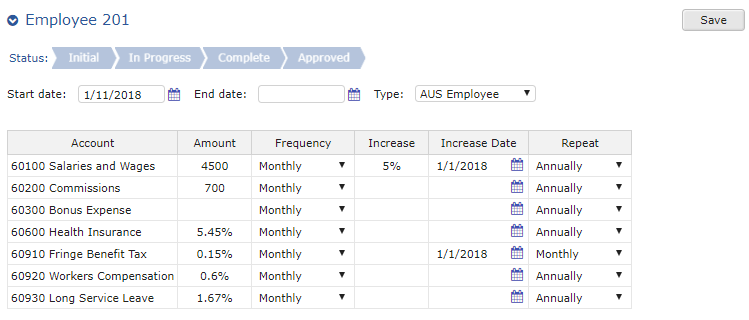
To configure an Employee record
- If you are adding a new employee, in the Start date field, type the work start date for the employee.
- If an employee has left the company, in the End date field, type the termination date for the employee.
- In the Type drop-down list, select the employee type (US Employee, for example).
- In the table, do any of the following:
Employee Record Setup Options
| Option | Description |
|---|---|
| Amount | List the amount assigned for each account. You can override any value in a cell. |
| Frequency | Select a time frequency to determine the number of payments (for example, Annually, Quarterly, Monthly, etc.). |
| Increase | Type a dollar amount or a percentage to apply an increase to the account. For example, you might type 7% for a yearly salary increase, or $2000 for a one-time bonus. |
| Increase Date | Type or select a date on which to apply any value in the Increase column. |
| Repeat | Select a time frequency to determine how often to pay each account. For example, you might select Biweekly for the Salary account. |
| 5. To apply your changes, click Save. |