Balance Inventory Using MEIO
Multi-Echelon Inventory Optimization (MEIO) is a method of optimizing the entire supply chain instead of using a point-by-point method. The goal of MEIO is to update and optimize safety stock levels across all echelons.
For example, if a product sold in a retail store is received from one of its distribution centers (DCs), the store represents one echelon of the supply chain and theDC another. The amount of stock needed at the store is a function of the service received from the DC. When an upstream DC provides efficient delivery, a smaller safety stock is required downstream by the retail store.
Note: To set up the MEIO structure, an administrator must add the supplier property as part of the system configuration.
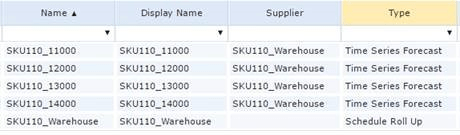
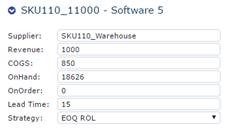
When you create records, populate the supplier field with the name of the record supplying the inventory to fill the demand of the record. For example, if the retail store receives their inventory from a specific warehouse, the record name for the warehouse is in the supplier field on the outlet record. You can set up the warehouse to supply multiple retailers.
Report showing items and Supplier
Item record
Supplier record
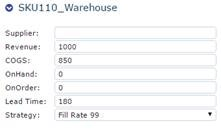
Once you have established these relationships between records, CCH Tagetik Supply Chain Planning rolls up the optimized order schedule to the Supplier record. The system then generates a proposed schedule for the Supplier record based on the properties of the Supplier record.
For example, each retail outlet has its own order strategy and lead time to account for packaging and shipping time from the warehouse. The warehouse may have a different order strategy and longer lead time to accommodate the time required to receive the inventory from the vendor.
Orders for retail outlets:
Retail Outlet Example
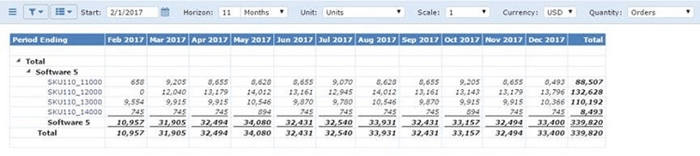
Create a forecast for your warehouse:
Warehouse Example

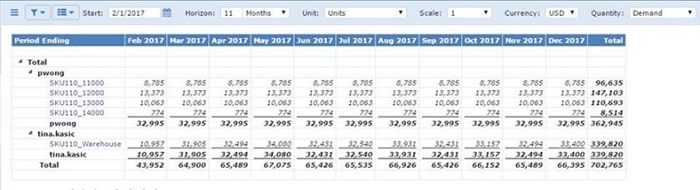
Since the forecast for the Supplier records are based on the order schedule of other system records, reports could look overstated. You can address this in one of the following ways:
- In the Supplier records, set Include in Export to No to exclude the record from all reports.
- Use grouping and filtering to separate the data based on business needs.
Grouping and Filtering
To configure a Schedule Roll Up record for MEIO
- In a module, on the menu (
 ), click New Record.
 - In the Record Type screen, click Schedule Roll Up, and click OK.
- In a record (child) you want to include in a Schedule Roll Up record (parent), in the supplier field, type the name of the Schedule Roll Up record.
4. Repeat step 3 for every child record you want to include in the roll up record.
5. Click Refresh to update your forecast.
6. In the upper-right of the screen, click OK.
7. To save your changes to the database, on the menu, click Save All Changes.