Reliability Record
Reliability records help you forecast the demand for parts by scaling the mean time to failure. These are useful in the following scenarios:
Reliability Record Scenarios
| Scenario | Description |
|---|---|
| Failure of parts | You may know the lifetime of a specific part is 3 years. Reliability records help you forecast how many of these parts you need to have on hand at any specific point in time. |
| Warranty claims | If you sell items that have warranties (cars, for example), Reliability records help you forecast typical needs for those items after the warranty expires. |
An example of an item that would benefit from the use of Reliability records is a razor. You could forecast for razor blades using Reliability records.
Reliability records can contain some or all of the following sections:
- Bill of Materials section
See BOM Part Record in Classic Mode. - Historical data section
See Add Historical Data to Records. - Reliability section - Comparable Items section
See Supplement Historical Data with Comparable Data. - Adjustments and Overrides Section - Monte Carlo Simulation section
To configure a Reliability record
- In the Reliability section, in the Scheduled Deployment table, type the values for scheduled introductions of parts in the future.
Reliability Section
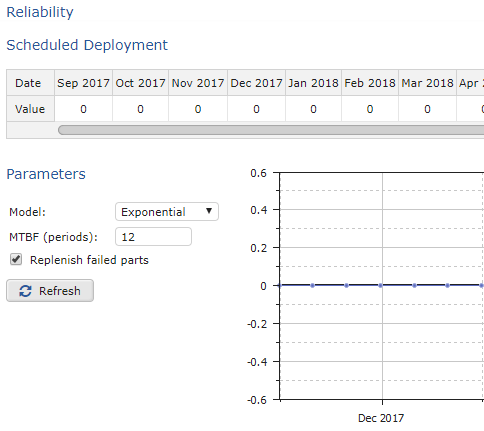 2. In the Parameters section, do the following:
Reliability Record Parameters
| Parameter | Procedure |
|---|---|
| Model | Select one of the following: - Exponential: Standard way to model reliability. - Fixed Lifetime - Weibull: Most commonly used distribution for modeling the reliability of products. Produces a bell curve shape. |
| MTBF (periods) | Type the number of periods (in months) for the MTBF (mean time between failures). |
| Replenish failed parts | Check to replace parts over time. |
| 3. When you are finished setting the parameters, click Refresh. | |
| 4. In the upper-right of the screen, click OK. | |
| 5. To save your changes to the database, on the menu, click Save All Changes. |