Inventory MTO Record
You use Inventory Make to Order records for items that have no scheduled pattern for ordering; orders are based solely on demand. These records typically set the safety stock a little higher and the underlying calculations differ from EOQ ROL and Inventory Periodic records. This record can be combined with any Time Series Forecast, Schedule Roll Up, or BOM Part Record to make the record a Make-To-Order replenishment planning record. This inventory strategy enables:
- Order now replenishments on firm order with lead time only.
- An outside of lead time option. MTO passes forecasted demand by bypassing the iterative daily inventory projection calculations to increase performance.
- Auto approve option on respective record to streamline flow through orders.
There are several types of strategy records available in CCH Tagetik Supply Chain Planning.
See Strategy Record.
Inventory Intermittent records can contain some or all of the following sections:
- Bill of Materials section
See BOM Part Record in Classic Mode. - Inventory MTO section
Inventory MTO section
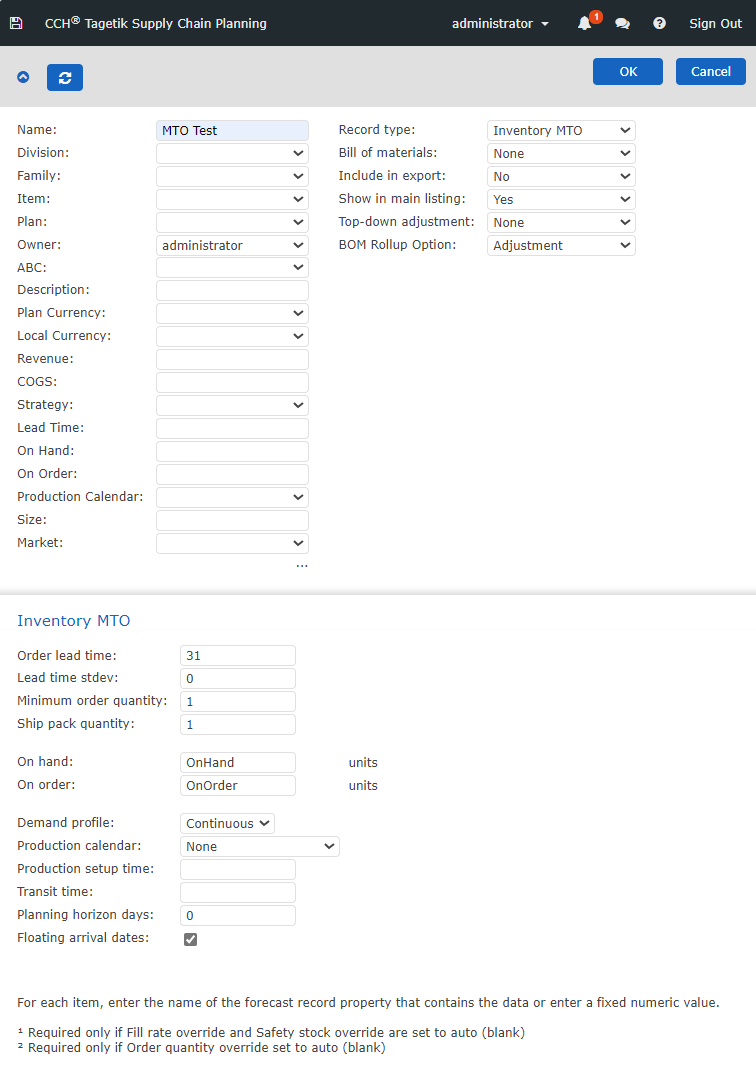
These fields apply to the lead time replenishment logic.
Inventory MTO Section
To optimize profits, you must balance the cost of carried inventory versus the cost of a stockout.
You can use a fixed number or call a record property (such as OnHand) in any of these fields. For example, Order lead time may be LeadTime in a Strategy record, and a fixed number in specific record.
Note: Some fields may already contain values, such as Lead Time. Administrators configure these values for each record. Typically, they do not need to be changed. Power users and administrators may view, add, or edit property values in the Setup screen.
Warning: Edit Strategy records with care since any change you make to a Strategy record affects every record to which it is applied.
Following are details about the Inventory MTO parameters.
Inventory MTO Properties
| Property | Description | Values Allowed |
|---|---|---|
| Order lead time | Number of days between placing and receiving an order. | - Fixed value (14, for example) - Field Property name (pre-populated) |
| Lead time stdev | Days of lead time uncertainty. | - Fixed value (14, for example) - Field Property name (pre-populated) |
| Minimum order quantity | Lowest quantity of a certain product a supplier is willing to sell. | - Fixed value (14, for example) - Field Property name (pre-populated) |
| Ship pack quantity | The smallest package the supplier is willing to ship. | - Fixed value (14, for example) - Field Property name (pre-populated) |
| On hand | Total number of units in possession. | - Fixed value (14, for example) - Field Property name (pre-populated) |
| On order | Number of units on order (not yet on hand). | - Fixed value (14, for example) - Field Property name (pre-populated) |
| Demand profile | Continuity of the demand of the item; values are: - Continuous: Orders come in on a daily basis. - Weekday: Orders are only placed on weekdays. | - Continuous - Weekday |
| Production calendar | The production calendar(s) allows you to enter non-working days (holidays and vacation days) that affect your overall schedule or affect a specific item. See Production Calendar. | Select a calendar |
| Production setup time | Number of days needed for production setup. For example, a factory requires 6 hours to switch over factory equipment to begin a new round of products. | Whole number |
| Transit time | Number of days needed to transport a product. For example, if an item is made on the opposite side of the country and has to be transported by train, it requires an extra 3 days to transport the item. | Whole number |
| Planning horizon days | The number of days into the future for which plans are made. This "fence" lets you add the number of days as a rolling horizon within which projected orders on the Supply record would not be suggested. As part of the Inventory Strategy, you can add a a number so that the software only suggests order dates that occur after the “As of date” plus the number of days you have added. | - Fixed value (14, for example) - Field Property name (pre-populated) |
| Floating arrival dates | The amount of time that a task in a project network can be delayed without causing a delay to subsequent tasks. Ideally, this field is used when moving up an order the system. This option allows the system to move up the whole order so order date and arrival date both move up when this box is checked. | When checked, this value allows floating arrival dates |