OPEX Record
Operating Expenditure (OPEX) records provide an input template with a similar look and feel to Excel®. They list a group of accounts and let you update starting amounts, annual changes, and spread methods in a single interface.
This record displays when the Budget Forecasting module is loaded into CCH Tagetik Supply Chain Planning as an instance.
OPEX Record
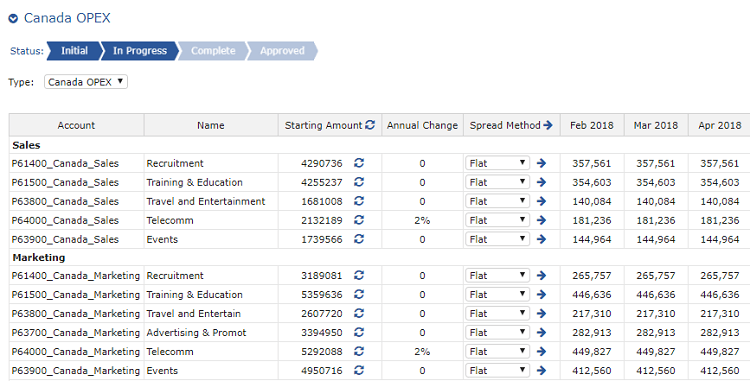
For example, you could quickly load a starting value based on the previous year and add an annual change of 5%, spread evenly or based on historical data through the next 12 months.
OPEX records are created by administrators.
To configure an OPEX record
- In the table, do the following:
OPEX Record Setup Options
| Option | Description |
|---|---|
| Starting Amount | Do one of the following: - Type a starting value. - Click the refresh icon to load the total for the previous 12 months (trailing 12). When you click refresh, you reload the historical data starting value and spread method. |
| Annual Change | If needed, type a dollar amount or a percentage to apply to the account yearly. |
| Spread Method | Select one of the following spread methods to allocate the starting value over future months: - Flat: Apply an even distribution monthly. - Historical: Have Wolters Kluwer review the previous 12 periods to find weighted amounts and apply those amounts. - Forecast: Apply the 95% confidence interval in the forecast (represented in forecast graphs as a pink band). - 4-4-5: Apply a 4-4-5 weighted value. - 4-5-4: Apply a 4-5-4 weighted value. - 5-4-4: Apply a 5-4-4 weighted value. |
You can also type a value to override a value in any monthly cell in the table. 2. To apply your changes, click Save.