Inventory Periodic Record
Inventory Periodic records specify when orders should be placed (weekly or monthly, for example). The safety stock is typically set a little higher and the underlying calculations differ from EOQ ROL and Inventory Intermittent records. Inventory Periodic records let you provide suppliers with known quantities and a consistent schedule using the Order smoothing horizon.
There are several types of strategy records available in CCH Tagetik Supply Chain Planning.
See Strategy Record.
Inventory Periodic records can contain some or all of the following sections:
- Bill of Materials section
See BOM Part Record in Classic Mode. - Inventory Periodic section
Inventory Periodic section
The top block of properties in the Inventory Periodic section contains overrides; they take precedence over the lower set of properties.
Inventory Periodic Section
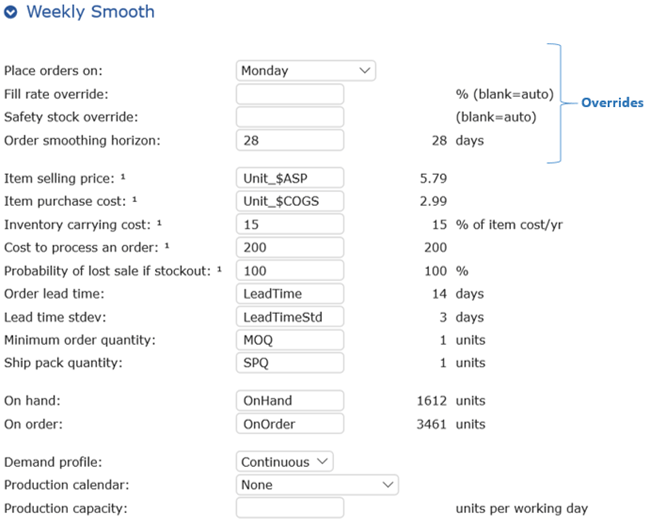
While overrides take precedence, you can keep numbers in the lower block of properties for future use (these are ignored if override values are set). Overrides are useful if you do not have some of the information required in the lower block of properties. For example, if you provide a Fill rate override, you would not need values for fields that are marked with a 1 in the lower properties.
Note: Some fields may already contain values, such as Lead Time. Administrators configure these values for each record. Typically, they do not need to be changed. Power users and administrators may view, add, or edit property values in the Setup screen.
Warning: Edit Strategy records with care since any change you make to a Strategy record affects every record to which it is applied.
Following are details about the override properties.
Periodic Strategy Record Override Properties
| Override Property | Description | Values Allowed |
|---|---|---|
| Place orders on | You can assign items to specific day of the week or month. When CCH Tagetik Supply Chain Planning integrates with ERM, new data is uploaded daily and the software calculates which items need to be ordered and how many (min/max). CCH Tagetik Supply Chain Planning does not load orders into your ERM, but it does load min/max values. This lets you use your ERM to provide order management. | Entries on drop-down list |
| Fill rate override | To determine a fill rate to target, compare the cost of overage (too much inventory) versus underage (cost of stockout). Start with a safer strategy and make adjustments as you get more historical data. If the Fill rate override is set to 99%, then over the course of time, you will fill 99 orders and backorder 1 out of 100 orders received. For items with sporadic demand, a 95% fill rate might seem reasonable, but your calculations may be off as you have less historical data points. For example, a single spike in sales affects the calculation and may lead to a high safety stock level to cover a potential spike in the future. You can cut a sales spike from the item's history to adjust. This is why it best to begin with a safe strategy and make adjustments along the way. Any contractual requirements you may have should be set as a Fill rate override. | - Fixed value (14, for example) - Field Property name (pre-populated) |
| Safety stock override | You would typically use a safety stock override only if the value should be zero (0). You can also specify a safety stock in terms of days (30 days worth of inventory, for example) to always cover X days' worth of future demand. When you specify in terms of days, CCH Tagetik Supply Chain Planning breaks down the demand forecast into a daily number, then calculates how much stock is needed based on the daily demand forecast and when future orders are arriving. The breakdown from month to daily demand is an even distribution across the days within a month. Safety stock is determined using standard calculations, with some exceptions like accounting for seasonality, uncertainty of demand, etc. CCH Tagetik Supply Chain Planning calculates this daily based on the fill rate and forecast uncertainty. | - Fixed value (14, for example) - Xdays (7 days, for example) - Field Property name (pre-populated) |
| Order smoothing horizon | If you know, in advance, that you will have spike in demand, this lets you spread out the order amounts rather than placing one large order just prior to the demand. For example, if you entered 60 in this field, orders would be evenly spaced across that 60 day time frame, rather than overwhelming your supplier with a huge order. If needed, you could create multiple supplier-specific Inventory Periodic records with their lead times and other details. | - Fixed value (14, for example) - Field Property name (pre-populated) |
The remaining properties provide auto optimization of your inventory.
Optimization of Inventory Section
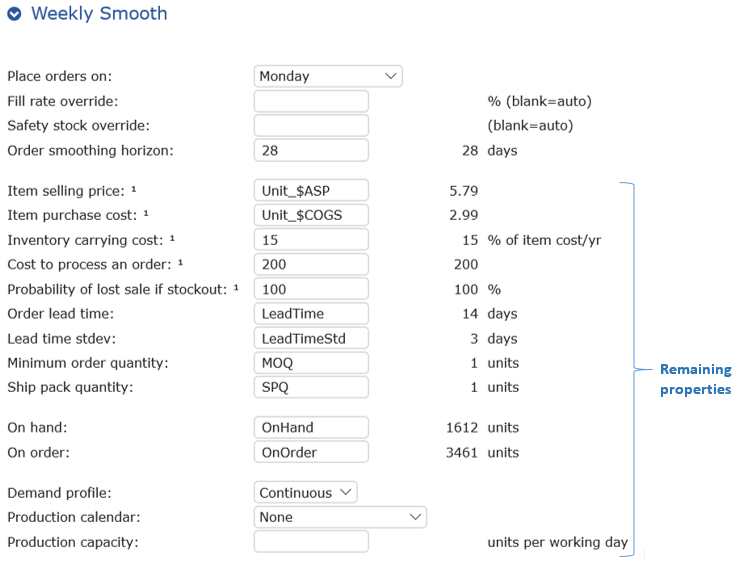
To optimize profits, you must balance the cost of carried inventory versus the cost of a stockout.
Following are details about the remaining properties.
Periodic Properties
| Property | Description | Values Allowed |
|---|---|---|
| Item selling price | Net selling price of the item; calculated using item record fields. For example, Unit_$ASP pulls data from the ASP field of records for calculation purposes. | - Fixed value (14, for example) - Field Property name (pre-populated) |
| Item purchase cost | Average price paid for the item; calculated using item record fields. For example, Unit_$COGS pulls data from the COGS field of records for calculation purposes. | - Fixed value (14, for example) - Field Property name (pre-populated) |
| Inventory carrying cost | Percent of the cost of the item per year (for example, capital, insurance costs, risk of spoilage, and warehouse space) | - Fixed value (14, for example) - Field Property name (pre-populated) |
| Cost to process an order | Includes all costs to process an order (for example, creating a purchase order, sending it to the supplier, fixed shipping costs, and receiving costs) | - Fixed value (14, for example) - Field Property name (pre-populated) |
| Probability of lost sale if stockout | Stockout costs $X. Keep in mind the intangible losses of a stockout, such as loss of good will. | - Fixed value (14, for example) - Field Property name (pre-populated) |
| Order lead time | Number of days between placing and receiving an order. | - Fixed value (14, for example) - Field Property name (pre-populated) |
| Lead time stdev | Spread of the distribution of lead time numbers. | - Fixed value (14, for example) - Field Property name (pre-populated) |
| Minimum order quantity | Lowest quantity of a certain product a supplier is willing to sell. | - Fixed value (14, for example) - Field Property name (pre-populated) |
| Ship pack quantity | The smallest package the supplier is willing to ship. | - Fixed value (14, for example) - Field Property name (pre-populated) |
| On hand | Total number of units in possession. | - Fixed value (14, for example) - Field Property name (pre-populated) |
| On order | Number of units on order (not yet on hand). | - Fixed value (14, for example) - Field Property name (pre-populated) |
| Demand profile | - Continuous: Orders come in on a daily basis. - Weekday: Orders are only placed on weekdays. | - Continuous - Weekday |
| Production calendar | The production calendar(s) allows you to enter non-working days (holidays and vacation days) that affect your overall schedule or affect a specific item. See Production Calendar. | Select a calendar |
| Production capacity | How many units can be completed in any work day. | - Fixed value (14, for example) - Field Property name (pre-populated) |