Consolidation scenarios tab
 User
User
 Application database > Processes tile > select process > Consolidator > select Consolidation Scenarios
Application database > > Navigation panel > Processes > select process > Consolidator > select Consolidation Scenarios
Purpose of the tab
This tab shows information on the data processing status of consolidation nodes on the consolidation scenario and allows you to run consolidation data processing in Impacted mode, or only on data for which the data processing is pertinent.
What it looks like
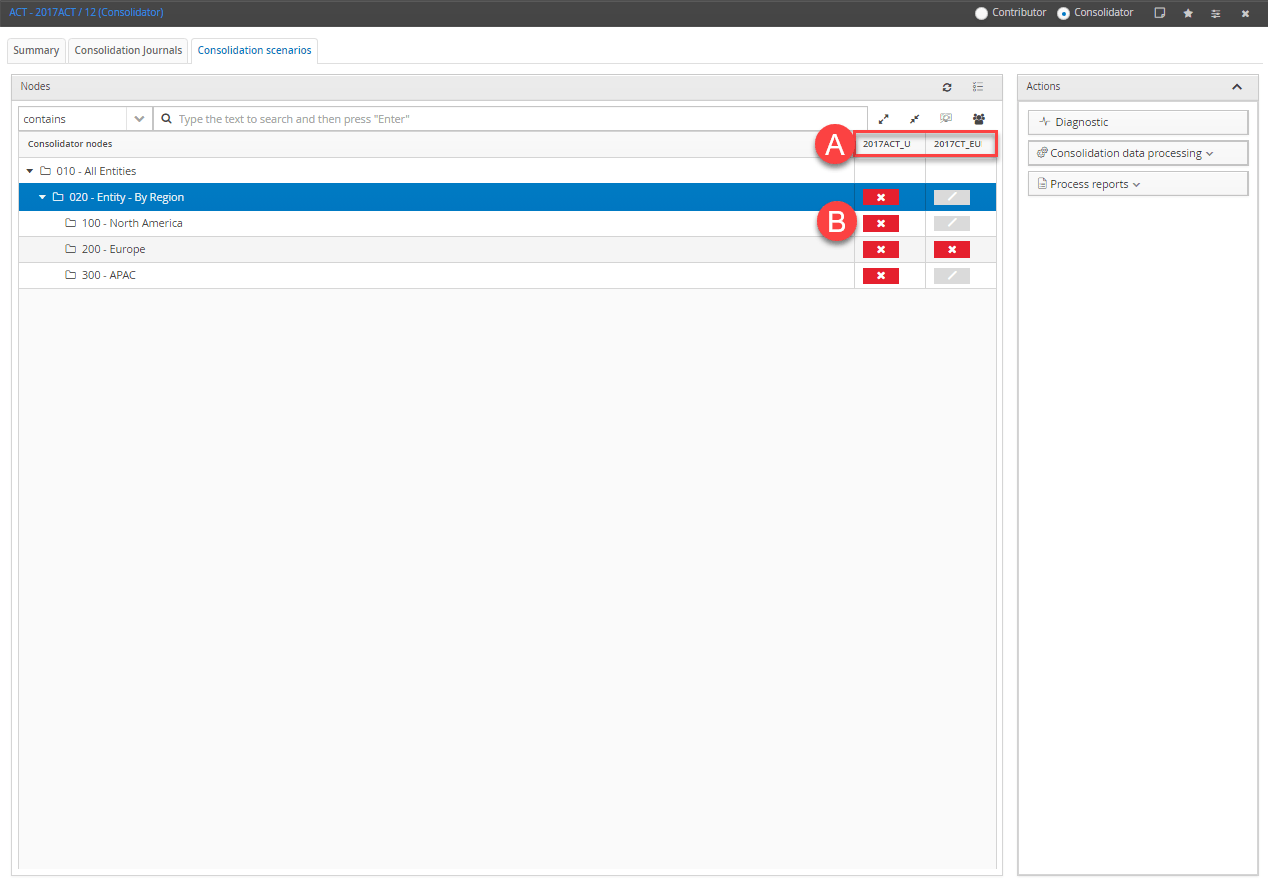
| Element | Description |
|---|---|
| A | Consolidation scenarios (B): in front of the scenario code, this indicates that the scenario is locked. |
| B | Node data processing status indicators. |
| Nodes | Shows the entities present in the organisational hierarchy associated with the process on which the user is authorised. : reloads Impacted status. Updates the status indicator. |
| Actions | Available actions for the selected node |
Progress indicators by node
| Element | Description |
|---|---|
| Node not significant for the consolidation scenario. Contains no entities for a certain consolidation scenario or the entities it contains have no data to process (e.g. all entities of the node have been assessed using the at cost consolidation rule). | |
| Node to be reprocessed to obtain consistent data on the consolidation scenario. | |
| Node on which all consolidation data processing has already been run. |