Store data offline
The term "Store data offline" refers to the transfer of offline data, divided by process or by scenario/period, from the original tables (called "standard") to equivalent tables (called "offline") containing the same information. This allows to reduce the tables size in order to improve the form and data processing run time.
Data moved to the offline tables will be available for the reporting but not for the data processing or for the data entry. The store data offline operation is reversible and consists in moving back the offline content to the standard tables.
The offline tables are identified by the prefix H_ followed by the original name of the tables.
Store data offline
The Store Data Offline utility can be accessed from the process cockpit (access the Admin home page, click on the Process tile, select the desired process > use the Actions ( ) > Process definition menu.
The Business Cycles section contains the Manage status hyperlink
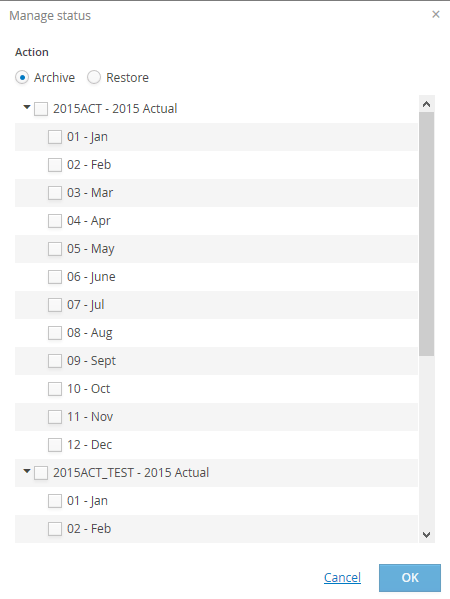
The system opens the Manage Status window; here the user has to select the Archive field
Then, the user must select the scenario/period for which the data must be stored offline.
In case of single submission processes, the data are stored offline and locked for all the scenarios / periods related to the process without the possibility of partialization
In case of processes with submission for scenario/period, besides the process it is necessary to choose the scenario / period.
The system shows only scenarios / periods which are not stored offline.
 The system locks all the scenarios periods it stores offline.
To store data offline, it is necessary to click on ok.
Once the procedure is completed, the system labels as “Offline” all the periods (original and consolidation) it has stored offline.
A period can be stored offline from the scenarios elements table, in the scenarios elements table, in the window of the periods related to them.
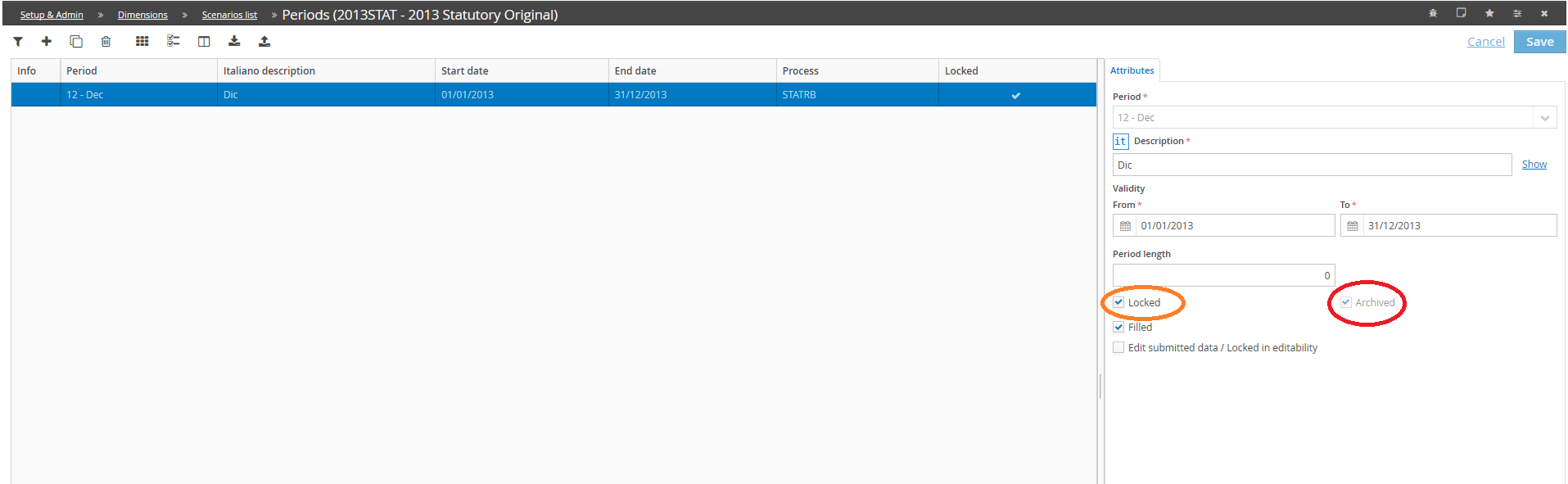
If all the scenarios periods of a process are stored offline, the process will be locked and stored offline as well.
The Offline filed is defined also on the process header if all the underlying scenarios periods have been stored offline
Restore data online
Data can be restored online at any time with the same distinction between single submission processes and processes with submission for scenario / period specified above.
The Restore data online utility can be accessed from the processes cockpit.
If the process is single submission or submission for scenarios periods and all the existing periods have been stored offline, a banner saying "The process and all its data are stored offline" with the Restore button ( )is displayed on the upper part of the process cockpit.
The "Restore Data online" utility does not unlock the scenarios /periods.