Business Workflow concepts
What is Business Workflow
A Business Workflow is an entity’s specific workflow. It is prepared in CCH Tagetik in such a way that users responsible for entering and processing data can do it in an order that matches the entity’s own way of working.
Business Workflow structure
The Business Workflow is made up of various logical and temporal steps, called steps. All logical steps can be preparatory to the next step and parallel to other steps. They are identified by a code and contain one or several activity flows, called task workflows. Every activity flow is made up of several activities (tasks) which must be run in a certain order.
Examples of steps
In a statutory consolidation process, it may be necessary to collect and submit data from financial statements and journals at different times and, subsequently, in a different step, collect data from a supplementary note.
In a budget process, however, it may be useful to separate the collection of revenue data from the collection of fixed cost data, as well as data on investments and staff costs.
Examples of tasks
In a Payroll data collection task workflow, the completion of each data entry form constitutes a different task.
Default Business Workflow
CCH Tagetik provides a default Business Workflow by Entity based on Entity dimension with code $WFModel, containing a single $STEP step. This Business Workflow can be used where there is no need to manage separate steps or specific activities other than submission.
Characteristics of the steps and task workflows
Steps and task workflows can be completed in series or in parallel. Steps are submitted once and how they correspond to each other defines the chronological order of submission. Steps completed in parallel can be submitted independently from each other and task workflows can be run simultaneously.
It is also possible to specify whether to allow certain steps to be submitted only after all the entities in the previous step have been submitted. This is useful for steps in which one entity attributes transversal costs to other entities. Accordingly, in the subsequent step the entities receiving those costs can submit the total of their own costs and those received from the previous step only after the previous step has been submitted in full, i.e. on the other entities as well.
The task workflows of contributor steps and consolidator steps may contain only tasks that concern the contributor user or consolidator, respectively.
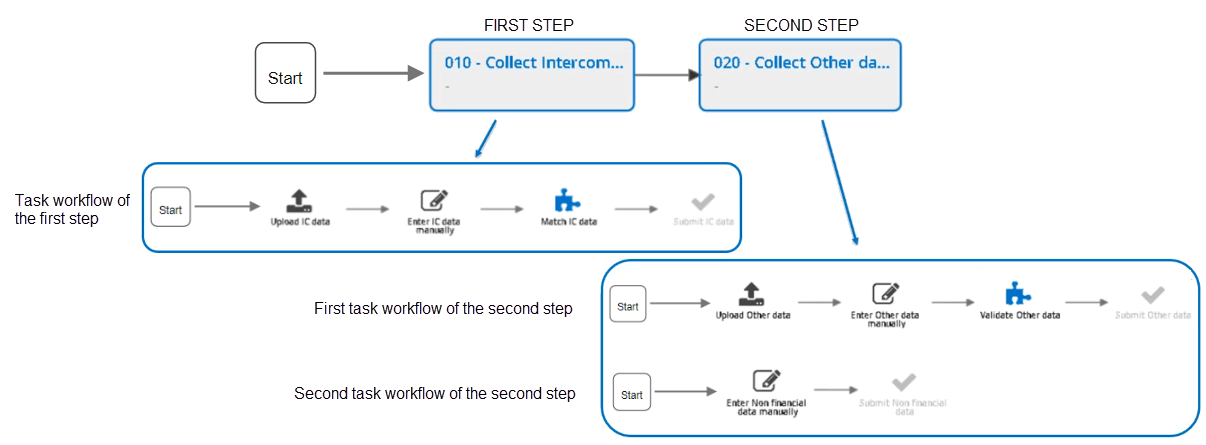
Example with two steps and task workflows in series
This image shows an extract from a Business Workflow graph made up of two steps. The first step contains one task workflow and the second step contains two in series.
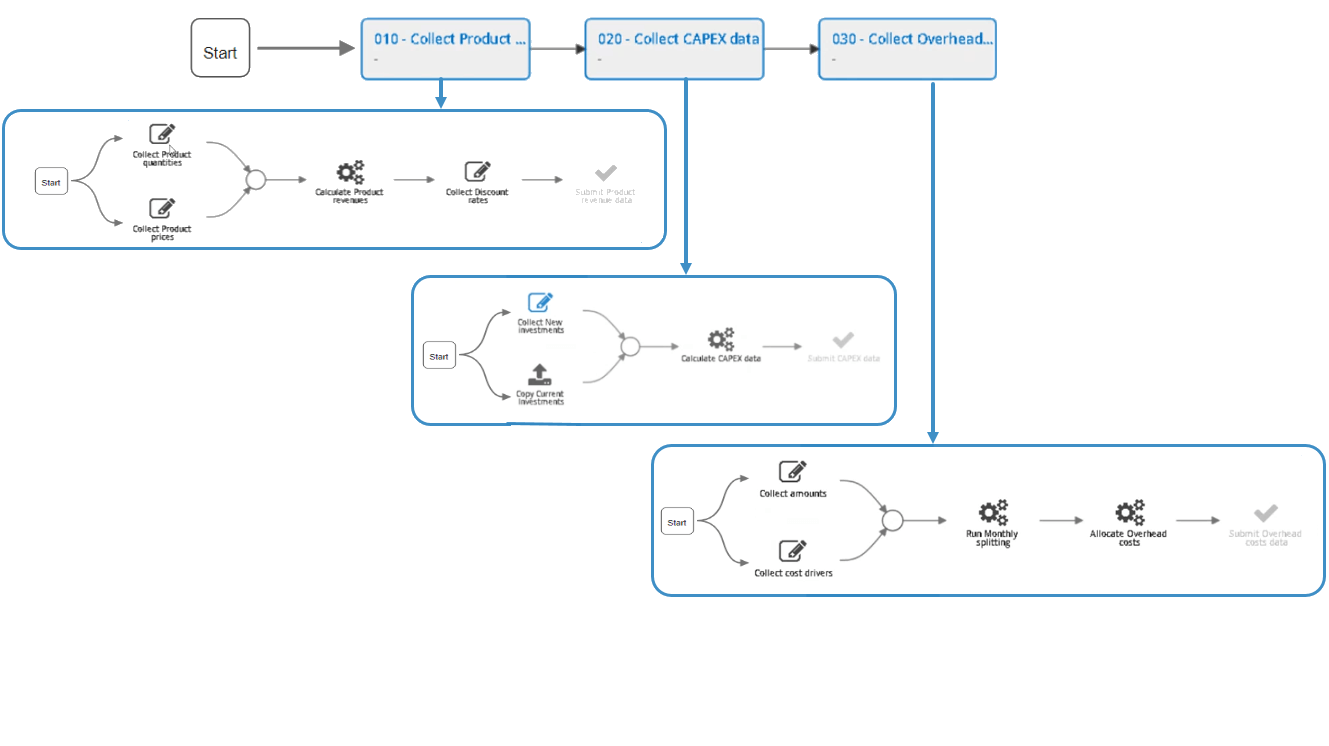
Example with three steps and with the steps’ first activities in parallel
This example shows a Business Workflow in which the first two tasks of each task workflow can be run in parallel. The next task can only be run after both tasks have been completed. You can only move to the next step once the previous step’s task workflow has been completed.
Particular features of task workflows
Several task workflows can be created, depending on the calculation models or needs of the various entities in the group. By default, CCH Tagetik provides two task workflows for every step; these are not visible in the task workflow definition, but are available during the process setup:
- $ - Task Workflow: to insert a submission only task for a process.
- $$ . Task Workflow: to insert a step where no significant tasks are run for the entity in a process.
Task labels
The activities run by tasks can be identified by labels attributed to those tasks. Several tasks can therefore be grouped under the same label. These labels can be referred to to assign tasks to several specific users.
Task groups
Individual tasks can be grouped, so the user can run the corresponding data processing with a single click, e.g. for consolidated data processing. Grouped tasks can be viewed as a single task and expanded later or run all together.
Completing task workflows
Every task workflow must be completed with a submission task. If necessary, one or more data approval tasks can be added later. This is useful when different people are responsible for submission and approval.