PR Builder
The PR Builder (often referred to as PO Builder) has all the same functionality as described in the Purchase Order section with some added features. It lets you add items to the purchase requistion (PR), download the PR into an Excel file, and see future orders.
PR Builder Screen
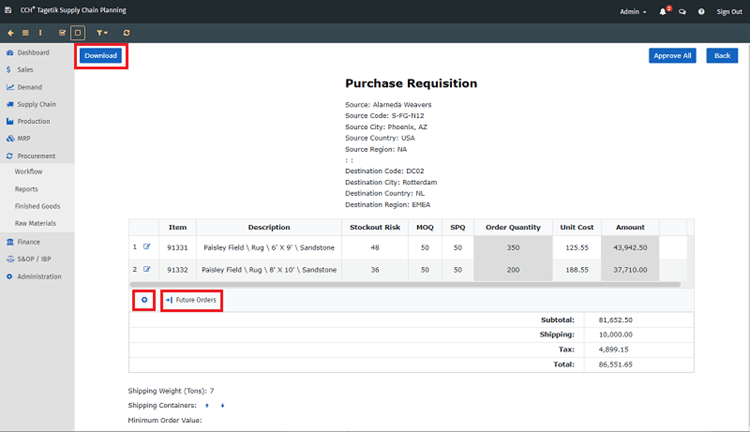
PR Builder Additional Fields
| Fields | Description |
|---|---|
| Download | Click this button to download the PR to an Excel file |
| Use this button to access the items you can add to the PR | |
| Future Orders | Click this button to see future orders due in days, weeks, or months that you can add to the current PR |
| Displays in the last column once an item has been added so the row can be deleted |
To work with the PR Builder
- To add an additional item, click on the
 and use the down arrow to select from
the list or the search icon to find the item.
and use the down arrow to select from
the list or the search icon to find the item.
The items listed depend on the supplier.
Once you add an item, you can delete it by clicking the  that displays in the
last column.
2. To download the file to an Excel file, click
Download.
that displays in the
last column.
2. To download the file to an Excel file, click
Download.
Which columns that display, can be changed using the Menu.json file. Only columns listed in the json file can be added to the Excel file. 3. To see future orders, click Future Orders.
Future Orders Screen

The items listed depend on the supplier. The Future Orders screen lets you:
- See the Horizon in days, weeks, or months and change how many you see.
- sort the items by any column you select.
- add the item to your current PR. Mark the checkbox(s) and click Add Selected.