Work with Inventory Status
If your product is configured to work with inventory, you have multiple options to assist with inventory optimization, including the Inventory Status interface.
Inventory Status Interface
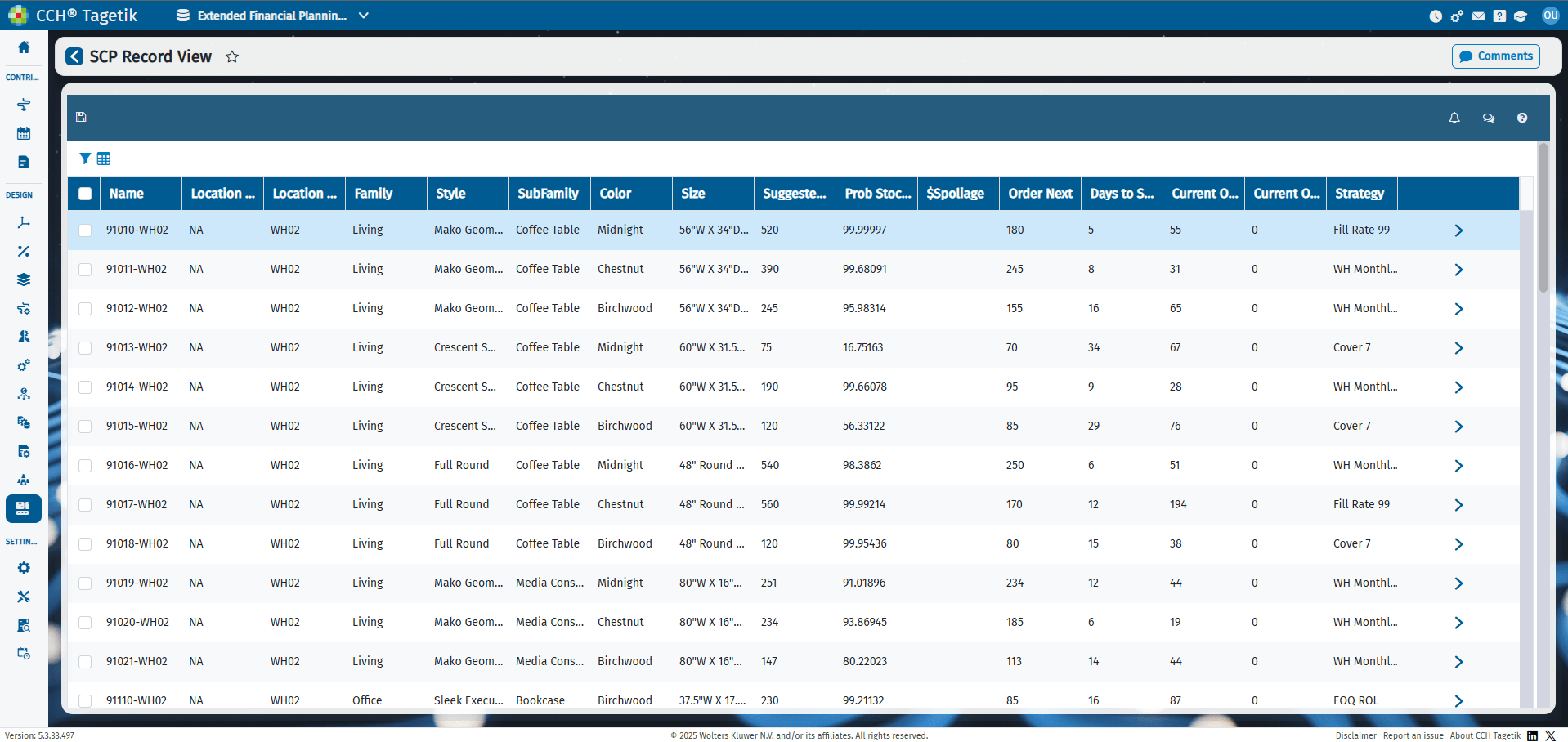 If you are using CCH Tagetik Supply Chain Planning primarily for inventory optimization, this interface provides a quick status and surfaces any supply issues. From this interface, you can drill down to specific records and make any adjustments.
See About the Inventory Section.
You can sort the table by column headers to get quick access to crucial data, such as Prob Stockout. You can also click any record to get further details or to take action.
For example, if you see you are close to a stockout of a specific item, you can click the item's record and, in the Inventory section of the record, see when the next order is expected (under Projected Schedule) and immediately place an order (under Custom Schedule/Past Orders).
The Annual Revenue column is the total expected revenue (units*average selling price) over the current calendar year.
The Inventory grid displays these fields automatically. You can add fields, if needed.
Inventory Grid Columns
| Fields | Description |
|---|---|
| Name | Name of the item. |
| Suggested Order | System recommendation for the number of units to order on the scheduled order date. This number is always 0 until the day the order is scheduled. For example, if you have a Weekly Monday strategy in place, then the Suggested order value is zero on all days except Mondays. |
| Order Today | Number of units at which your stock reaches the minimum level (time to reorder). |
| Prob Stockout | The likelihood that your inventory will go to zero (stockout). |
| Forecast Spoilage | Used if your inventory has an expiration date such as grocery items. This is how much of that item is projected to spoil today. |
| Order Next | How many units to order. |
| Days to Stockout | Number of days until you have no items left of that unit. |
| Current On Hand | Total number of units in possession. |
| Current On Order | Number of units on order (not yet on hand). |
| Strategy | What strategy is being used to predict when this item will be sold. |
| Minimum | The minimum number of units you should keep in your inventory at all times. This number is often the same as your stockout number, but not always. |
| Maximum | The maximum number of units you should keep in your inventory. Having too much stock on hand is often costly since there is a chance of potential spoilage and warehouse space costs. |
| Safety Stock | Value is calculated based on the Strategy record in place. Safety stock calculations are dependent on the type of strategy used, and highly dependent on the uncertainty and standard deviations. CCH Tagetik Supply Chain Planning's safety stock calculation is a form of the standard versions of determining safety stock, but with added complexities and nuances. |
| Fill Rate | Value may be calculated based on the Strategy record in place. To always have the item in stock, set this to 100%. The fill rate is the percent of orders filled from inventory with no back orders. If the fill rate is less than 100%, you may need to force a stock-out to achieve the desired result. For example, if there was no uncertainty in demand, then a zero safety stock would yield a 100% fill rate. If the fill rate target is 99%, the safety stock must be negative. It may sound strange to plan to stock out, but it delivers a profit-optimized result when there is uncertainty in demand. |
| Annual Revenue | Amount of money made for this item in a given year before costs or expenses are taken out. |
| Owner | Owner of the record. |
See also Global Menu Options and Icons.
See also Multiple Sources of Inventory