The Scenario: basic concepts
Definition
Together with the period, the scenario represents the Tagetik time dimension. This also allows you to define the version of the data.
Scenario types
There are three types of scenario:
- original scenario
- consolidation scenario
- snapshot scenario
Original scenario
This scenario is used for data entry: amounts, consolidation journals and entity journals. This allows you to manage the tax year and the version of the data. Please find below some examples of original scenarios:
- 2018ACT, actual data for the 2018 tax year
- 2018BDG, budget data for the 2018 tax year
- 2018F6, forecast data for the 2018 tax year, after the month of June is closed.
An original scenario may be related to and may feed one or more consolidation scenarios.
Consolidation scenario
This scenario allows you to define the entities in the scope of consolidation: holding company, companies to be consolidated, currency and consolidation method, original scenario from which to read the data etc. A consolidation scenario is always linked to one - and only one - original scenario, and it stores consolidated data that cannot be edited manually. If the same original scenario is linked to several consolidation scenarios, the same data may be processed differently as long as the different consolidation perimeters and rules are respected. For example, based on the original data for 2018 for companies A, B, C and D, it is possible to create the following consolidation scenarios:
- two different consolidation scenarios, one for companies A and B and one for companies C and D
- hypothesizing that company A owns 70% of company B and 40% of company C, and that company B owns 30% of company C and 40% of company D, it is possible to create two consolidation scenarios. One for company B’s consolidation, in which company C is consolidated using the equity method, and one for company A’s consolidation, in which company C is consolidated using the line-by-line method.
Snapshot scenario
This scenario allows you to take a snapshot of data before making any changes. For example, when it is useful to keep different versions of a budget in place before deciding upon the final one.
Snapshot scenarios are particularly useful for data processing linked to financial planning.
Scenario groupings
Tagetik allows you to create groupings of scenarios based on different criteria, for example based on the version of the data (actual, budget, forecast), on the type of scenario (consolidation, original) or on the sub-holdings; this simplifies the selection process during the reporting phase.
Tagetik has a default aggregation structure ($) and two default nodes:
- $ORIGINAL, related to each new original scenario by default
- $CONSOLIDATION, related to each new consolidation scenario by default.
The grouping structure may be customised, indicating the nodes to which each new original scenario will be related by default, and the nodes to which each new consolidation scenario will be related by default.
The scenario grouping nodes are used:
- during the reporting phase
- to simplify the management of user rights for the scenario dimension
- to simplify the selection of a group’s scenarios.
However, data are never saved on the nodes. All data (amounts, adjustments, etc.) are saved on the individual scenarios.
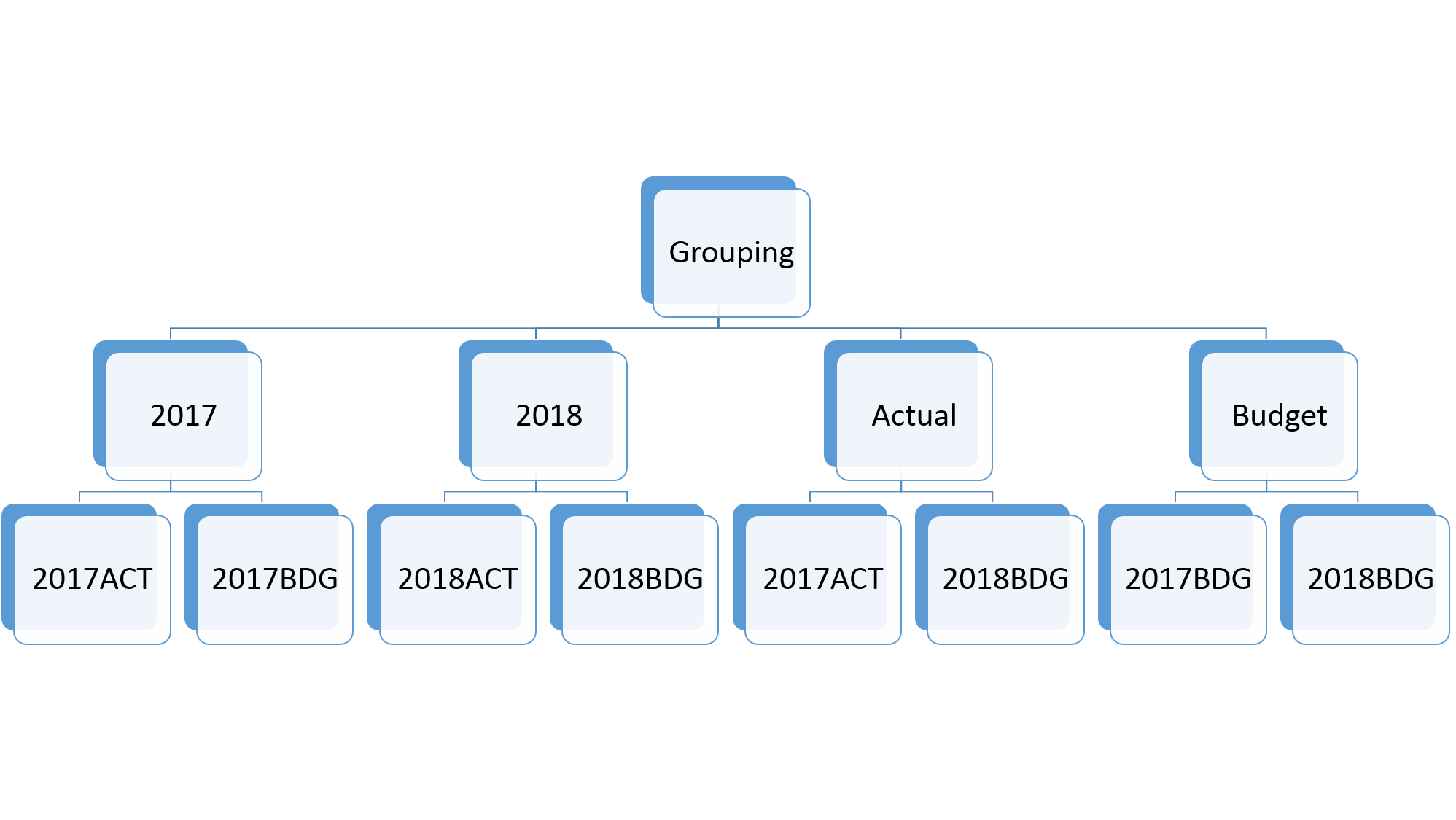
Example of a grouping of scenarios
The following scenarios have been defined: 2017BDG, 2018BDG, 2017ACT and 2018ACT. These may be grouped in two ways: based on the year or based on the version of the data. The two classification types may co-exist within the same grouping.