Personal Data Protection
In order to comply with current data protection directives, various functions have been introduced.
Setting an Analytical Dimension
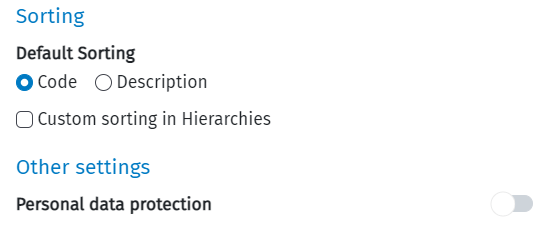
When creating an analytical dimension, it is possible to activate the Personal Data Protection option in the Personal Data pane.
Operation
If Personal Data Protection is enabled, Dimension data will be stored encrypted, and decrypted once displayed. Activities performed on this Dimension will be recorded in log files.
Changing this field later will encrypt or decrypt all elements of the Analytical Dimension. This must be confirmed by accepting a warning window, and will launch a data processing to make changes to the database.
Restrictions
If the user is not authorised to handle sensitive data, via a role with 0004095 - Personal Data Protection enabled, then the field will not be visible, and the Analytical Dimensions created will be considered unmarked for Personal Data Protection.
Enforcement of the right to be forgotten of personal data
This function is only possible for users who have associated a role with the function 0004110 - Right to be Forgotten enabled, otherwise the following field will not be visible and the function will not be allowed.
If the dimension is marked as containing sensitive data, it is possible to apply the right to be forgotten for all selected items in the grid from the dimension list page.
"Apply the right to be forgotten" is an item in the menu of the "Wizard" button. A pop-up will open where the previously selected items are shown in the grid.
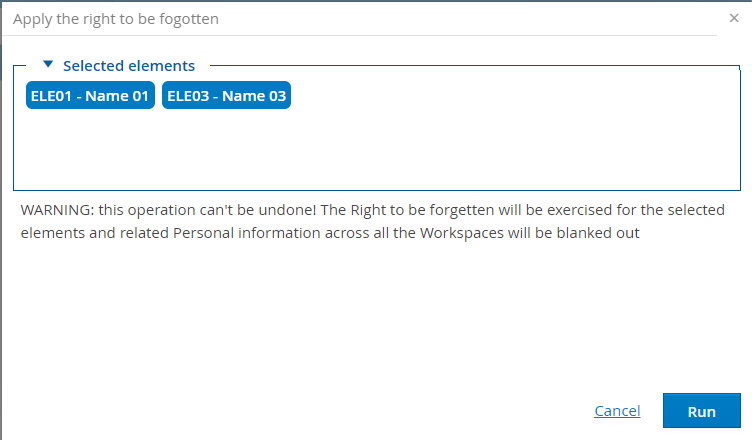
 To ensure data consistency, all of the following points must be valid, otherwise we will get an error message and it will not be possible to start data anonymisation processing:
- All workspaces using the dimension must be offline.
- There must not be an update procedure in progress (e.g. DATASET UPDATE)
- There must be no data processing (check, apply, remove) in progress for the protection of personal data.
When anonymisation data processing is in progress, it is not possible to change the online/offline status of a dataset, a workspace, and it is not possible to launch the data processing (check, apply, remove) for the data protection purposes.
Once data processing is completed, the following will be anonymised:
-
all descriptions of the grid items selected in the 'Apply right to be forgotten' popup
-
all fields marked as personal data used in all records (partitions, datasets, workspaces and all types) that refer to the items selected in the 'Apply right to be forgotten' pop-up.