Original scenario
Characteristics of a scenario
The original scenario is used to insert data such as amounts, journals and consolidation data. Data may be inserted manually or automatically with massive data entry functions. Each scenario is identified by the following characteristics:
- code
- description
- type
- previous and next scenario
It is fundamental to indicate the previous and next scenario in order to link the various reporting periods and to allow for carrying forward over two reporting periods.
Certain scenarios may be made inactive. This allows you to record and store a lot of data, but to only view and select the original scenarios containing the data of most interest.
Several consolidation scenarios and snapshots may be related to an original scenario.
Example of an original scenario linked to more than one consolidation scenario
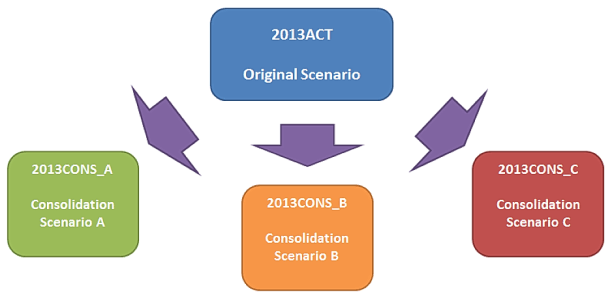
This example shows how a scenario containing original data for 2013 can be used to create various consolidation scenarios:
- several sub-consolidations
- two consolidation scenarios, one consolidating 10 companies and another consolidating 100 companies
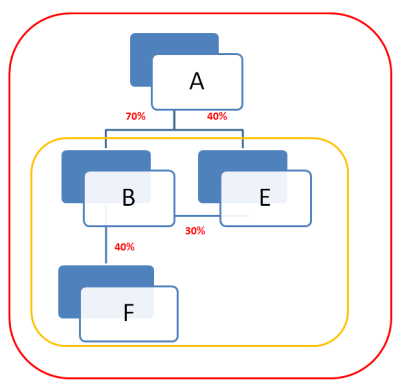
- if company A owns 70% of company B and 40% of company E, and company B owns 30% of company E and 40% of company F, it is possible to create two consolidation scenarios, one for company B’s consolidation, in which company E is consolidated using the equity method, and another for company A’s consolidation, in which company E is consolidated using the line-by-line method.
Correlations between scenarios
Correlations may be created between original scenarios in order to achieve different results:
- To compare data in current, previous and following scenarios, according to a time-based logic.
- To compare budget data or forecasts against actual data, for example during the reporting phase. These correlations are known as “reference scenarios”; up to five reference scenarios are permitted.
For reporting purposes, it is possible to give each original scenario the following attributes:
- year, i.e. the tax period to which the scenario refers
- version, i.e. the version of the data to which the original scenario refers
Original scenario periods
The Tagetik time dimension is always made up of the combination of the two physical ‘scenario’ and ‘period’ dimensions. In order to insert data, it is therefore necessary to relate at least one period to an original scenario. For example, in order to collect budget data for 2018, it is necessary to specify a specific period of interest, whether that be 2018BDG 03, or 2018BDG 06, or 2018BDG 09.
When a new scenario is created, it is sufficient to define what kind of ‘number of months’ set-up is required (monthly, quarterly, annual, etc.) and the start date; using the wizard, the necessary periods will then be created and related automatically.
Period characteristics
Each period of an original scenario is identified by the following characteristics:
- a code, which must be an existing value in the period table
- a description, which is filled in automatically but can be changed afterwards
- a start date
- an end date
An original scenario period may be given the following statuses:
- Locked. In this case, it cannot be modified by adding new data. This status is useful to control the moment when it becomes possible to begin inserting data.
- Filled. In this case, it is possible to exclude data belonging to a particular scenario/period from the reports. This status may be useful to hide periodic data for the periods created but for which data have still not been collected, or to reduce the list of scenarios that may be selected and to simplify operations.