Control groups: basic concepts
Definition
A control group is a set of accounts between which a relationship is created in order to achieve two objectives:
- to check the balancing or coherence for the data inserted
- to calculate detail accounts or variation accounts
Comparisons are carried out between data of accounts belonging to two groups:
- Set 1, i.e. the accounts for which the detail or variation is provided.
- Set 2, i.e. the detail accounts or variation accounts representing the entries of Set 1 accounts.
Note: for the Variation and Detail control groups, Set 1 identifies the parent accounts and Set 2 identifies the child accounts.
Calculation rules generated by the control groups
Through the control groups, it is possible to generate calculation rules and obtain the following results:
- calculate the parent account as the sum of the detail/variation accounts. In this case, the data are inserted in the detail or variation accounts, and the amount of the normal account is obtained as the sum of its entries or details.
- calculate a detail/variation account as the difference between parent accounts and the remaining detail/variation accounts.
Example control group for coherency check
In this example, four child accounts refer to one parent account. The sum of the detail accounts corresponds to the parent account amount.
| Account name | Amount | Account type |
|---|---|---|
| Trade receivables | € 100,000 | Normal parent account |
| Trade receivables: 0-30 days | € 10,000 | Detail child account |
| Trade receivables: 30-60 days | € 10,000 | Detail child account |
| Trade receivables: 60-90 days | € 80,000 | Detail child account |
| Σ Detail accounts | € 100,000 | Sum of detail accounts |
Example of control group to automatically calculate an account
In this example, a number of detail accounts have been related to a trade receivables account in order to break down the amounts that will be paid with different due dates (30-60 days, 60-90 days, etc.).
| Account name | Amount | Account type |
|---|---|---|
| Trade receivables: 0-30 days | € 10,000 | Detail child account |
| Trade receivables: 30-60 days | € 10,000 | Detail child account |
| Trade receivables: 60-90 days | € 80,000 | Detail child account |
| Total trade receivables = Σ Detail accounts | € 100,000 | Parent account calculated as the sum of the detail accounts |
Control group type
It is possible to create the following types of control groups:
| Type | Description |
|---|---|
| Detail | This relates the accounts to the relative details. For example: revenue breakdown by geographic area, product type, etc. |
| Variation | This relates balance sheet accounts, memorandum accounts or ‘other stock’ accounts to the respective entries made over the course of the year. For example: purchases, sales, equity, etc. |
| Balancing | This defines free balancing rules between accounts, details and variations. For example: the rule that checks that the depreciation detail included in the variation form of tangible asset variations, segmented by asset type, corresponds to the row of the P&L account that contains the depreciation of tangible assets at global level. |
| Coherence | This defines rules that check, if there is an amount, whether there is another amount or another account. For example: if there are financial debts, there must also be the relative interest expenses. Coherency may be mono-directional, i.e. the presence of amount A implies the presence of amount B, or bi-directional, i.e. the presence of amount B may also imply the presence of amount A. |
System control groups
The following system control groups are predefined; they cannot be deleted, but rather only some of their details may be modified:
| Name | Description |
|---|---|
| $PL | This checks that the P&L is balanced, i.e. that the P&L result account is equal to the sum of all the other normal P&L accounts, with the sign changed. |
| $RESFLOW | This checks that the balance sheet result accounts have the same amounts as the balance sheet result variation accounts. |
| $RESULT | This checks that the balance sheet result account is the same as the P&L result account. |
| $BS | This checks that the balance sheet is balanced, i.e. that the balance sheet result account is equal to the sum of all the normal balance sheet accounts, with the sign changed. |
Control operators
In order to create calculation and checking rules within the control groups, more complex operators are also available compared with the basic ones (>, <, =, ...).
| Operator | Description |
|---|---|
| Coherence | If the algebraic sum of the values in the parent accounts is not zero, then also the algebraic sum of the values present in the child accounts must be different to zero. |
| Bi-directional coherence | - If the algebraic sum of the values in the parent accounts is not zero, then also the algebraic sum of the values present in the child accounts must be different to zero. - If the algebraic sum of the values in the parent accounts is zero, then the algebraic sum of the values present in the child accounts must also be zero. |
| Coherence by element | If the algebraic sum of the values in at least one of the parent accounts is not zero, then also the algebraic sum of the values present in at least one of the child accounts must be different to zero. |
| Bi-directional coherence by element | - If the algebraic sum of the values in at least one of the parent accounts is not zero, then also the algebraic sum of the values present in at least one of the child accounts must be different to zero. - If the algebraic sum of the values in all the parent accounts is zero, then the algebraic sum of the values present in all the child accounts must also be zero. |
Groupings of control groups
It is possible to organise control groups in groupings. These groupings are useful:
- in reporting
- to select all the control groups belonging to the same group at the same time
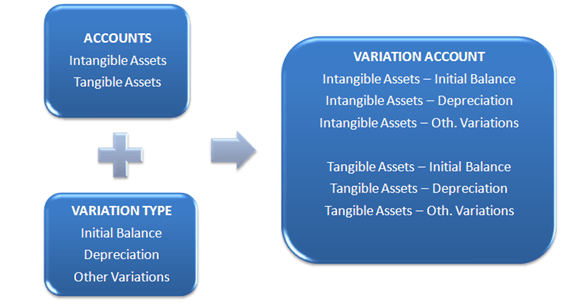
Example of the creation of a control group
In this example, starting from the following normal accounts:
- Tangible assets
- Intangible assets
and from three variation types:
- Initial balance
- Amortisation/Depreciation
- Other variations
The Create details and variations function generated, at the same time:
- six new variation accounts
- two variation control groups
The two normal accounts will be the parent accounts for each control group.
Updating control groups
The control groups need to be updated in the following cases:
- when new variation/detail types are added to the variation/detail types grouping node used to generate the control group
- when changes are made to the attributes of the variation/detail types related to the variation/detail types grouping node used to generate the control group