Data tables clean-up
Tagetik provides a convenient data processing to delete wrong data or data that are no longer useful
Setup & Admin > tile Data processing > Data Clean Up > Data tables
Navbar> Data processing > Data Clean Up > Data tables
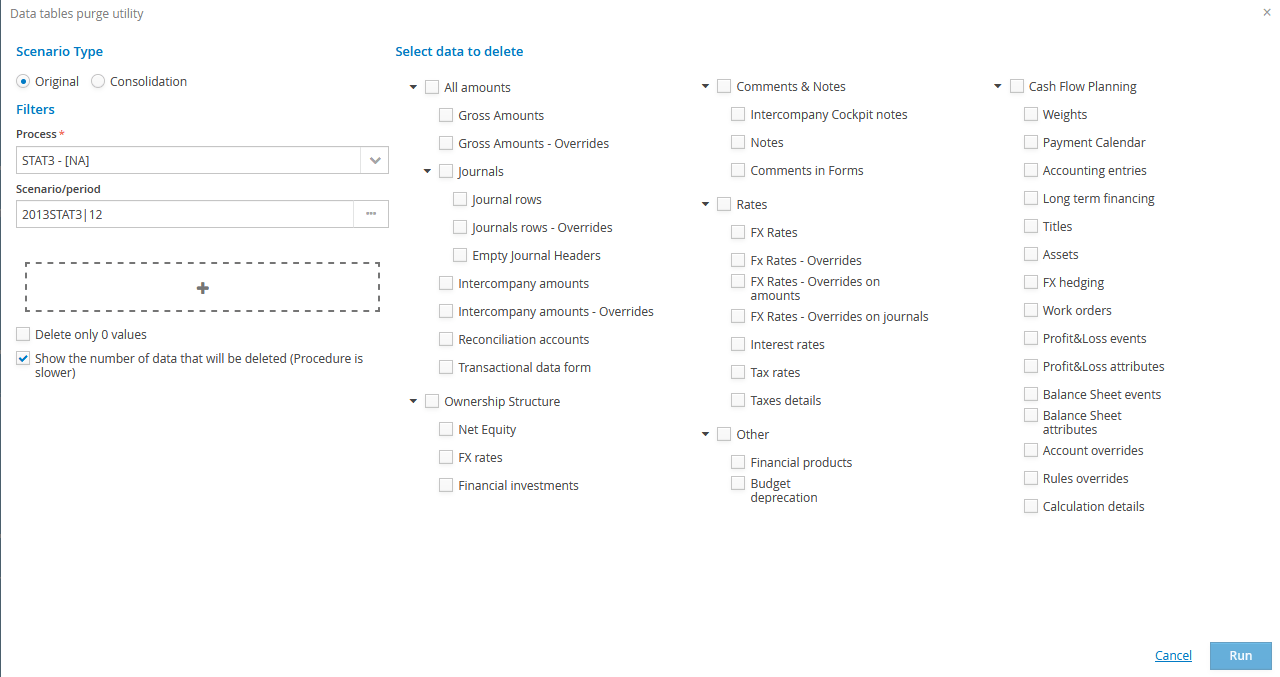
It is necessary to filter the data to delete by Process and Scenario/period and then add, if necessary, additional specific filters : User (UserUpd), Category, Account, Entity, Entity node, Custom dimension 1-5, Date (DateUpd), Origin (this option is very useful when you want to massively delete all data with a specific origin for the specified process)
 For some deletions it is not necessary to select the Scenario/Period:
Cash flow, Weights
Cash flow, Payment Calendar
Cash flow, Accounting entries
Cash flow, L/T Financing
Cash flow, Titles
Cash flow, Assets
Cash flow, FX hedging
Cash flow, Work Orders
Cash flow, Calculation details
Cash flow, Account overrides
Cash flow, Rules overrides
Ownership structure register, Net equity
Ownership structure register, FX rates
Ownership structure register, Financial investments
Other, Financial products
Other, Budget deprecation
Some specific filters are not available for certain types of deletion
Delete only zero values if enabled, it deletes only the rows with amount zero.
The deletion can be run on the following elements:
-
Amounts
-
Gross amounts
- Gross amounts - Overrides
- Adjustments
- Journals rows
- Journals rows - overrides
- Delete the journal headers if empty
- IC amounts
- IC amounts - overrides
- Reconciliation accounts
-
Transactional form data
-
Ownership structure register
-
Net Equity
- FX rates
- Financial investments
-
Other information
-
Comments and Notes
-
Intercompany Cockpit notes
- Notes Forms
-
Comments Forms
-
FX rates
-
FX rate type
- Overridden FX rates
- Specific overridden FX rates on amounts
- Specific overridden FX rates on journals
- Interest Rates
- Tax Rates
-
Taxes detail
-
Other
-
Financial product: calculation details
-
Depreciation: calculation details
-
Cash Flow Planning
-
Weights
- Payments calendar
- Accounting entries
- L/T Financing
- Titles
- Assets
- FX hedging
- Work orders
- P&L events
- P&L attributes
- Balance Sheet events
- Balance Sheet attributes
- Account overrides
- Rules overrides
- Calculation details
After specifying the process and the filters to identify the data to delete, it is possible to run the clean-up operation just by clicking on Run.
Download Purge Queries
When the "Show the number of data that will be deleted (Procedure is slower)" option is enabled, the window below pops up
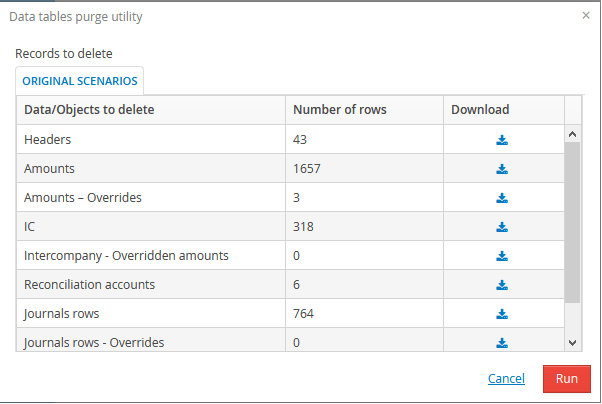
For each "Data/ Objects to delete" it is possible to Download the related queries that can be run by clicking on Run.
After downloading the file, you can run each query (on any Query Analyzer) to display the rows that will be deleted.
For each download file, if all queries are run, the total number of rows will correspond to the value of the "Number of rows" column.
Then you can decide whether to run or to abort the operation. If you decide to proceed with the deletion, the following applies.
Once the operation is completed, the system displays a Data processing is complete window from which it is possible to extract the detail log or export such log in Excel format
It is possible to hide this window by flagging the "Show only in case of error" field