Add Firm Orders to Records
Firm Order adjustments can be added to point to a data source that includes orders on specific days in the future. These can be used for either comparisons, consumption, or merging into the forecast. This allows the forecast to reflect demand that is on a specific day, which is more accurate for demand reporting and inventory optimization.
Setting a firm order with a Merge adjusted forecast allows you to set a netting option as explained in Netting Options for Merged Firm Orders. Netting allows you to shift your demand forecast forward and/or backward to account for demand that may have happened earlier or later than initially planned. The result of the various netting procedures allows for better inventory optimization due to more granular planning of when the demand is planned to happen.
Netting Options for Merged Firm Orders
| Netting Option | Explanation |
|---|---|
| None | No netting is used |
| Even Split | 50% of the overage is pulled forward one period, and the other 50% of the overage is pushed out one period |
| Half-period boundary | If the overage is due to firm orders in the first half of the month, then the overage is shifted forward one period. If the overage is due to firm orders in the second half of the month, then the overage is shifted back one period. |
| Proportional in period | The number of days the overage is due to the firm orders within the month is calculated and the overage is proportionally distributed forward and backward one period based on when the overage occurs within the month. |
To add firm orders row to the Adjustments and Overrides table
- In a forecast record, in the Adjustments and Overrides table, at the beginning of the Overrides row, click the Add Adjustment icon (
 ).
).
Adjustments and Overrides Table 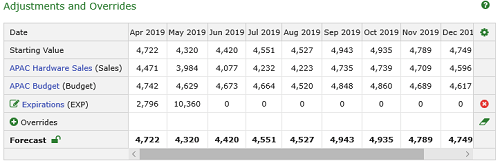
See Open and View Records. 2. In the Adjustment screen from the Adjustment Type list, click Firm Orders.
Adjustment Screen 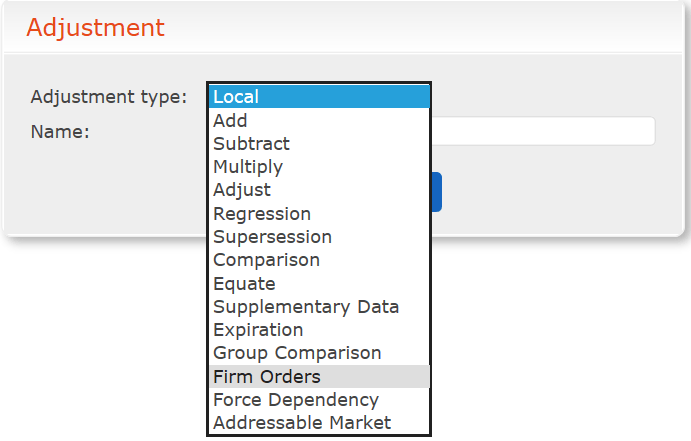 3. Identify your adjustment in the Adjustments and Overrides table by typing a Name.
4. Select the Data Set.
5. Select how you want to adjust the forecast by selecting one of the following:>
3. Identify your adjustment in the Adjustments and Overrides table by typing a Name.
4. Select the Data Set.
5. Select how you want to adjust the forecast by selecting one of the following:>
Select how you want to adjust the forecast by selecting one of the following:
Adjustment Types
| Adjustment Type | Use |
|---|---|
| None | The data set it uses as a comparison. |
| Merge | The resulting forecast is the maximum of the forecast and orders. If the orders are larger than the forecast, then the resulting forecast is equal to the orders and they are accounted for on the specific days. If the forecast is larger than the total orders, then the total forecast remains unchanged, but the orders are still accounted for on the specific days they occur. If a netting option is selected, then the resulting netting calculation occurs based on the netting table described in Netting Options for Merged Firm Orders. Select the Netting as None, Even Split, Half-period boundary, Proportional in period, or Remaining in period. Type the number of Override periods. |
| Add | The order is added to the forecast and accounted for on the specific day. There is no netting process for this adjustment type. Netting is automatically set to None. |
| 6. Click OK. |
You can now see inventory drops at specific dates including the next firm order and any expiration of inventory that is going to happen. 7. Save your changes.