Row/column filters tab
Excel > CCH® Tagetik >  Design > open form > open or create matrix > Row/column filters
Purpose of the tab
This tab allows you to set filters on the rows and columns of the matrix. These filters are elements and/or nodes of the dimensions tree that are added and modified in the local row/column filters tree and determine the selection of data managed in the rows and columns.
What it looks like
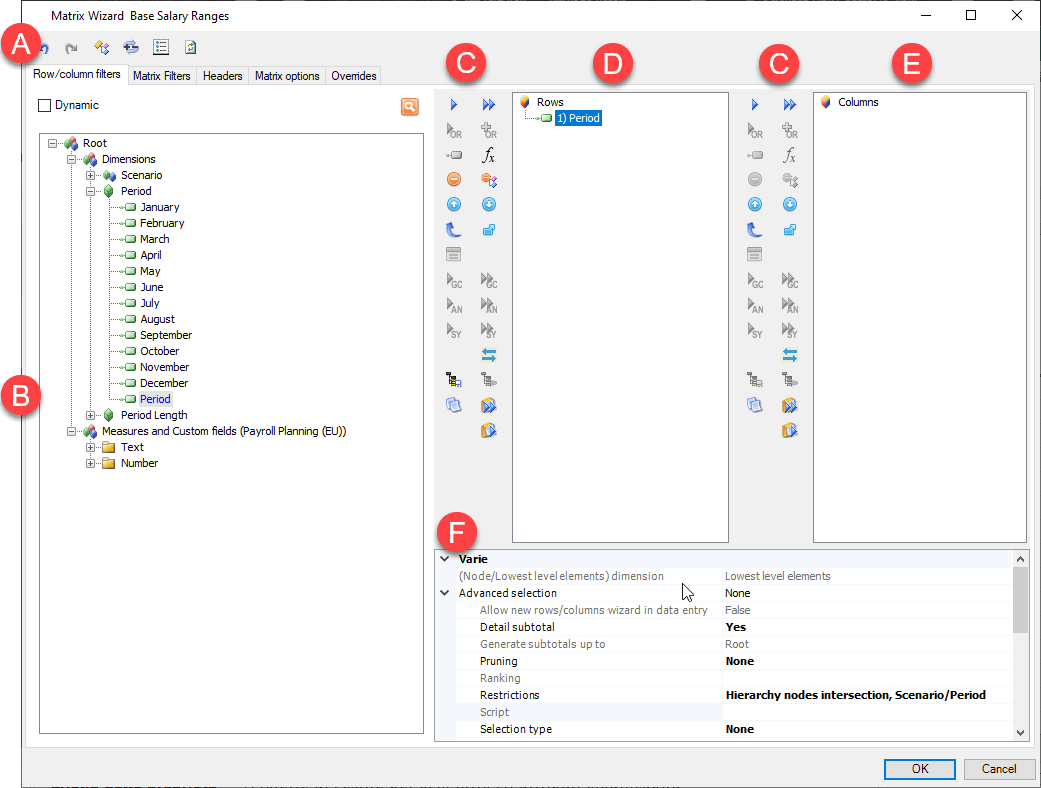
| Element | Description |
|---|---|
| A | Action buttons in all tabs. See Configuration window structure. |
| B | Dimensions tree |
| C | Buttons specific to the tab |
| D | Local row filters tree |
| E | Local column filters tree |
| F | Table of properties of the selected element in the definition area |
Tab sections
| Element | Description |
|---|---|
| Dimensions tree | Show the list of available dimensions. - system dimensions (scenario, period, account, entity...) - custom dimensions (e.g. "Products", "Cost centres" ...) - specific reporting dimensions (e.g. period length) - specific dimensions of some reporting functionalities (e.g. Column form, Counter and Status, used in the management of transactional data entry forms) |
| Local row filters tree | Shows the list of filters set on rows. |
| Local column filters tree | Shows the list of filters set on columns. |
| Properties table | - Allows you to manage the editable attributes of the selected dimension or filter. |
Buttons in the tab
| Element | Description |
|---|---|
| Adds one or several elements or nodes selected in the dimensions tree under the selected node in the filters tree. | |
| Only with filters already defined, adds one or several elements or nodes selected in the dimensions tree to all filters already defined. Note: if there are no pre-defined filters in the column, it functions like the button. | |
| Adds one or several filters selected in the dimensions tree, creating a OR type logical relationship. OR logical relationships can only be created with elements or nodes belonging to the same dimension. The added filter is labelled with the concatenation of the individual element codes separated by ",". The value displayed is equal to the sum of the elements entered. | |
| Adds one or several filters selected in the dimensions tree to a selected existing filter, creating a OR type logical relationship. The added filter is labelled with the concatenation of the codes of the individual existing and added elements, separated by ",". The value displayed is equal to the sum of the elements entered. | |
| Adds the control group selected in the dimensions tree to a filter in the rows/columns. | |
| - Adds the control group selected in the dimensions tree to all filters already defined. | |
| Analytically adds, under the selected filter, the FST selected in the dimensions tree. See . | |
| Analytically adds, under all filters, the FST selected in the dimensions tree. | |
| Synthetically enters the FST under the currently selected filter. | |
| Synthetically adds, under all filters, the FST selected in the dimensions tree. | |
| Save a filter as predefined. The new filter is then added to the dimensions tree. See Predefined filters. | |
| Update a predefined filter. The new filter is then added to the dimensions tree. See Predefined filters. | |
| Add an empty placeholder element. | |
| Adds a placeholder on which a logical formula can be inserted. See Formula filters. | |
| Pastes the copied filters under the selected filter. | |
| Pastes the copied filters under every filter. | |
| Allows you to copy the structure of a filter. | |
| Only with filters already defined. Moves the selected element up one position. | |
| Only with filters already defined. Moves the selected element down one position. | |
| Only with filters at several levels already defined in the row/column columns. Moves the selected level up one position. | |
| Only with filters already defined. Inverts the row filters and column filters. | |
| Only with filters already defined. Replaces en bloc the selected elements of a filter with elements selected in the dimensions tree. Useful for reusing a filter by replacing its elements, but not its properties. | |
| Only with filters already defined in the rows/columns with an OR logical relationship. Deletes one or several elements from the filter containing the OR logical relationship. | |
| Only with filters already defined. Deletes the selected element or node. | |
| Only with filters already defined. Deletes the entire level of the selected filter. |
Properties table
| Element | Description |
|---|---|
| Expands a set of details which change a filter property. | |
| Expands the list of possible values for the property. | |
| Opens the property configuration window. |
For details of the possible options in relation to properties, see Row/column filter properties.
Filter colour legend
Only for account dimensions.
| Element | Description |
|---|---|
| - Green: the sign is the same as the dimension class sign. - Orange: the sign has been changed automatically based on its class. See Sign class. - Red: the sign has been changed in the filter properties. See Sign change. |