Data processing run from reporting
Data processing from forms
The reporting system allows you to run data processing directly from forms, using the filters set in the same forms as run parameters. This data processing allows you to load data onto the system, edit them and run complex calculation algorithms (e.g. calculations related to the consolidation area or financial planning area).
This data processing must be inserted in the forms in the form design step and can only be run from data entry forms.
Data processing configuration
The configuration of data processing is guided and requires the following steps to be completed:
- Select the data processing to configure.
- Define the method for retrieving the value of the parameters needed to run the data processing.
Note: the presence of errors in this step prevents the data processing from being run (e.g. if a cell field with which a parameter must be defined returns an error). 3. Define the run settings. 4. Assign a code and description to the created run.
Example of options for retrieving the value of the parameters
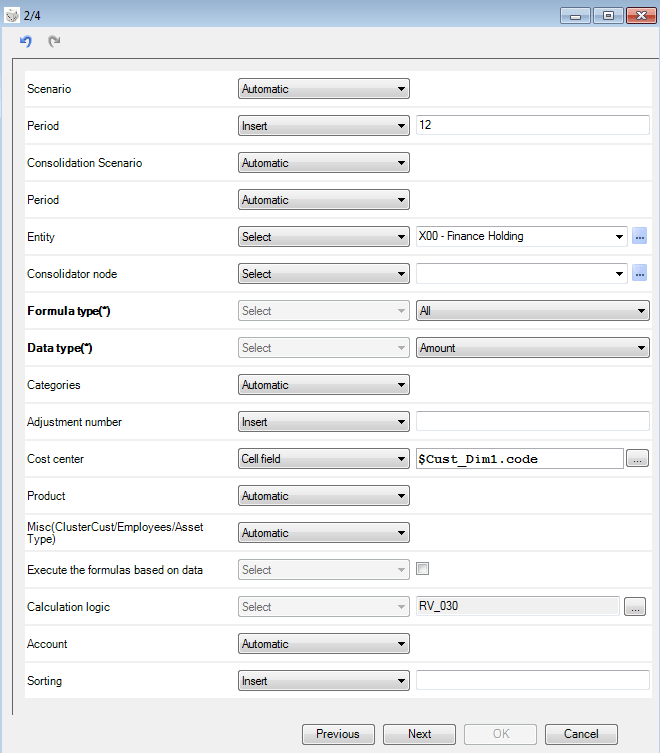
To insert Calculation logics data processing in a form, it is necessary to define the method for retrieving the value of the parameters shown below. Some parameters refer to CCH Tagetik dimensions, such as Scenario and Entity, others refer to the type of calculation logic to be processed and the type of data to be processed.
The values of the Scenario, Category, and Custom dimensions parameters are retrieved automatically from the form’s run parameters. The Period parameter was typed, the Entity parameter was selected from the list of tables and the Cost centre parameter was recovered from a cell field. Calculation logic requires the user to indicate the calculation logic to be run.