SmartInsight page
 User |
 SmartInsight tile
Navbar > Reports & Analysis > SmartInsight
Navigation Panel > Reports & Analysis > SmartInsight
Purpose of the page
This page allows you to extract and display data from the CCH Tagetik application database.
What it looks like
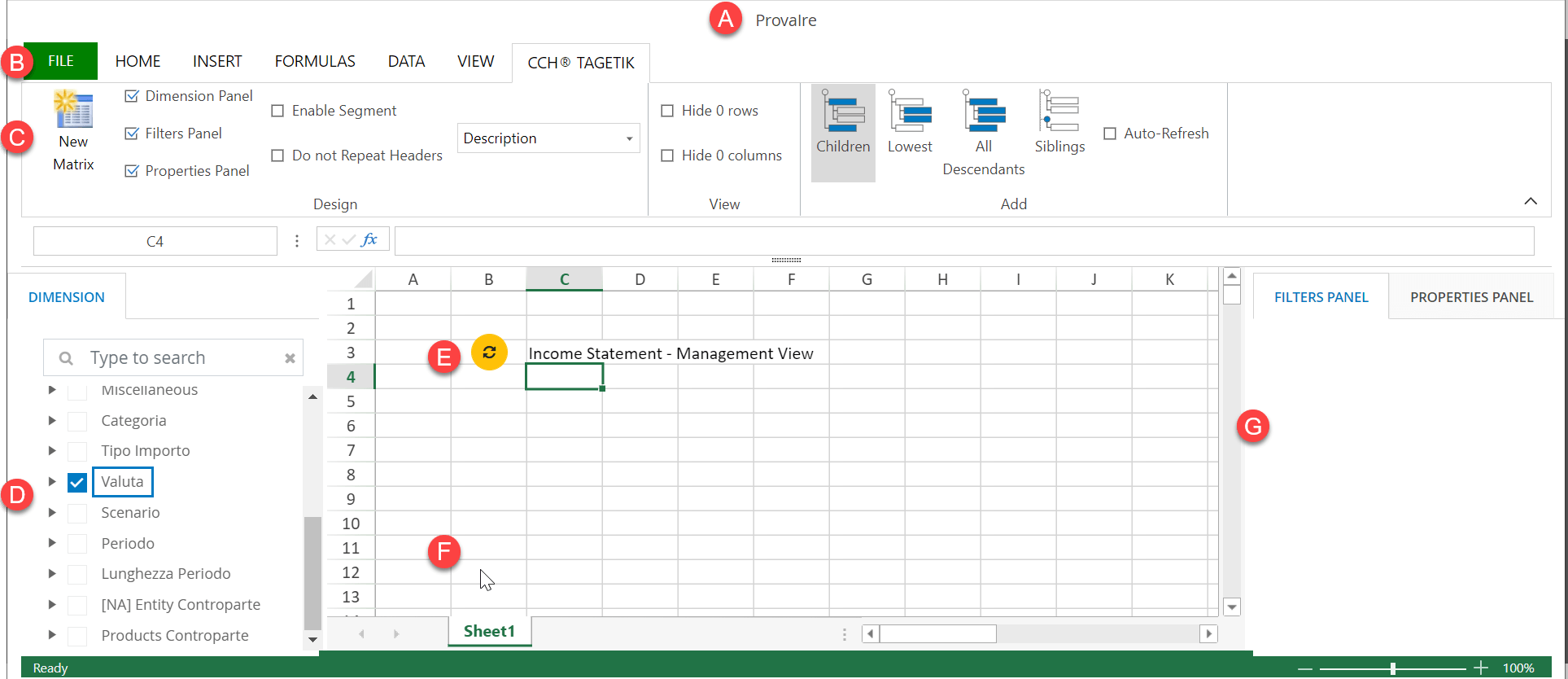
| Element | Description |
|---|---|
| To | SmartInsight sheet name and, for shared sheets, the name of the user owning the sheet |
| B | Menu bar. In addition to the standard Excel menus, it also opens the toolbar of CCH Tagetik. |
| C | Tool bar |
| D | Dimensions panel |
| E | Matrix update button, one for each matrix. It also indicates its status: - : modified matrix. View detailed data. - : unmodified matrix. Note: this button does not update the applied styles or edits to formulas. |
| F | Spreadsheet. It can contain several matrices. |
| G | Configuration Tab: - Filter panel: shows the filters applied to the matrix by dimension/hierarchy. - Properties panel: shows information about the selected cell in the matrix and any conversion information. |
Buttons in the toolbar CCH Tagetik
| Element | Description |
|---|---|
| Design | |
| New Matrix | Creates a matrix at the selected cell in the work area. When enabling the matrix, you can select either the financial workspace or a dataset, virtiìual dataset or a AIH datsource of your choice. |
| Dimension panel | Shows/ hides the dimensions panel. |
| Filters panel | Shows/Hides the filter panel where the filters applied to the selected matrix are listed by dimension/hierarchy. |
| Properties panel | Shows/hides the property panel of the selected cell. |
| Enable segment | Shows/hides intercompany data related to Entities within a chosen Entity node. Intercompany data are displayed in the filter panel and in rows/columns containing a hierarchy: - entity - custom 2 - counterparty entity - custom dimension 2 IMPORTANT: Be sure to update the matrix to display current data. Note: function not available if there are multiple matrices or for matrices drawn on the Analytical Workspace. |
| Do not repeat headers | If enabled, it shows the headings of rows/columns of nested dimensions only when one of the dimensions changes and not on all rows/columns. This improves the readability of data. |
| Display mode | Selects which dimension information (code, description, code and description) to display for all matrices in the following places: - in the dimensions panel - in the filter panels - in the row/column headers By default, an empty SmartInsight sheet displays the information defined in the form display settings (see Settings window). |
| View | |
| Hide 0 rows | If enabled, hides rows with a value of zero in all cells. If the SmartInsight sheet is the result of a web form 2.0 conversion, the form setting is inherited. Note: not available if there are several matrices. IMPORTANT: Be sure to update the matrix to display current data. IMPORTANT: The function also applies to changing or inconsistent matrices. Then all rows and columns could be hidden and only the refresh button would remain visible. |
| Hide 0 columns | If enabled, hides columns with value zero in all cells. If the SmartInsight sheet is the result of a web form 2.0 conversion, the form setting is inherited. Note: not available if there are several matrices. IMPORTANT: Be sure to update the matrix to display current data. IMPORTANT: The function also applies to changing or inconsistent matrices. Then all rows and columns could be hidden and only the refresh button would remain visible. |
| Remove 0 values | If enabled (button with dark grey background), deletes all rows and columns with value zero in the data update operation on a matrix. Note: the operation only affects the matrix being updated IMPORTANT: Deletion of rows and columns is irreversible. IMPORTANT: If the matrix has no data, only the refresh button is shown on the screen without any header. |
| Add | |
| Children/Lowest/All descendants/ Siblings | Set the drill-down. If enabled, when a row/column header is double-clicked, it adds as many rows/columns to the matrix as the following elements: - the children of the aggregate node in the row/column header (Children). - the lowest level elements of the aggregate node in the row/column header (Lowest). - the leaves of the aggregate node in the row/column header (All descendants). - the siblings of the aggregate node in the row/column header (Siblings). Note: The Siblings option does not apply for dimension root nodes. |
| Auto-refresh | Enables automatic matrix update after a drill-down. |