Track changes
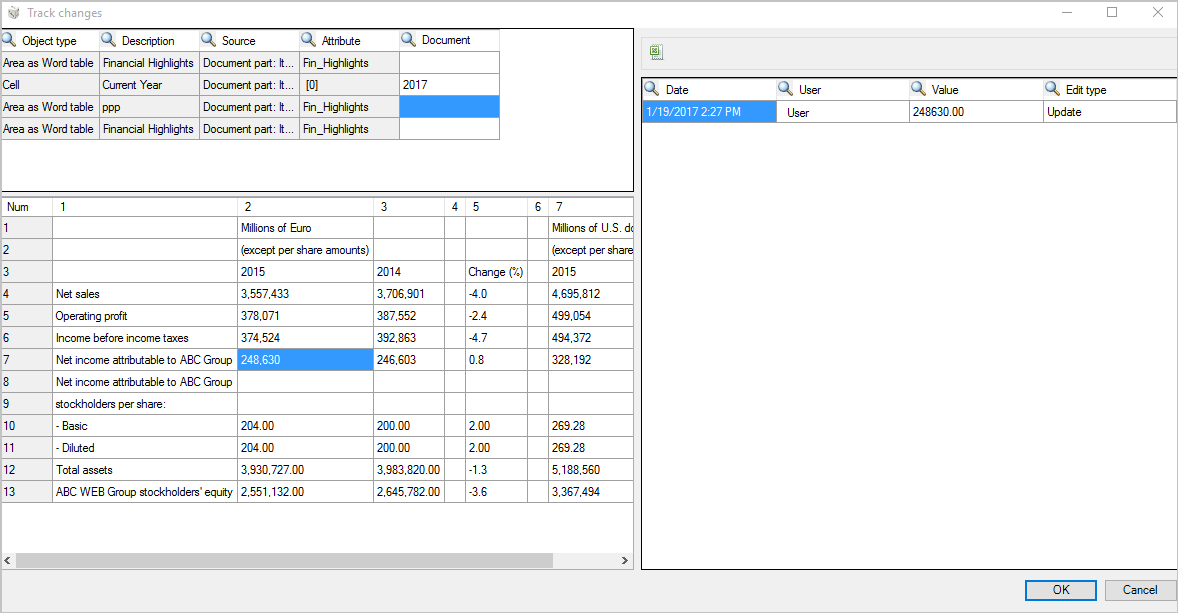
The system allows filing all the modifications made to the content of an object. After saving the document, the system analyses all objects and for each one, if the content is different from the one previously saved, adds a row with the new value. The system can file the following attributes:
- Date: date at which the modification was saved
- User: user who made the modification
- Value: displays the new value
- Edit type: type of edit (Manual override or Update),
This set of information can be displayed by opening the document and then clicking on the  Track changes icon available in the Utility area of the Edit structureribbon bar. The utility shows the list of all objects of the document and all the modifications made to the selected element.