How to generate the whole document or the intermediate nodes
At any time, also before each manage user has submitted the document part for which he is responsible, any user with the necessary user rights can see the entire document or any intermediate part of it including the content of all lower parts.
Every time a node of the document is opened, if the automatic check of the document parts to update is enabled ( Document properties > Advanced> Disable "Document part to update check" option disabled), the system checks which document parts have been modified since the last time they have been included in the node we are trying to update.
In order to determine which document parts need to be updated, the system compares the date and time of the attachment with the date and time of the last update and, if the latter is earlier than that of the attachment , it displays the document parts to update, otherwise it doesn't. If the source of data to insert into the document is the database of Tagetik, then the system does not perform any comparison between the dates and therefore it always displays all the document parts as to be updated.
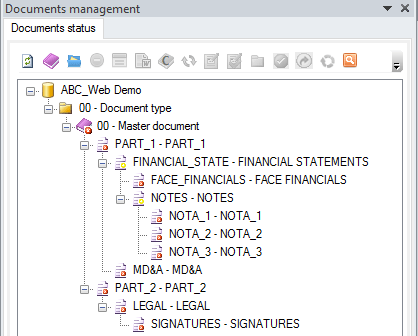
Assume the following situation and that we open the "FINANCIAL_STATE" node:
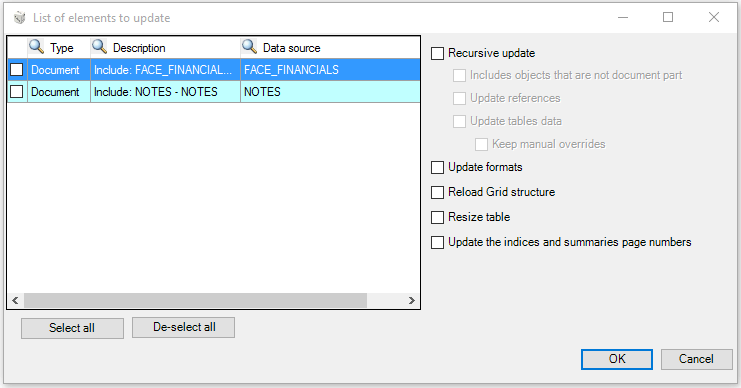
Once the document parts check is completed, the system displays the "List of elements to update" showing the document parts to consolidate in order to update the node with the last modifications. In this window it is possible to select each single sub-part or all sub-parts ( “Select all" button), create columns filters (the "Search" button  is highlighted meaning that data are filtered) and sort the available records ("Sorting" button on each column).
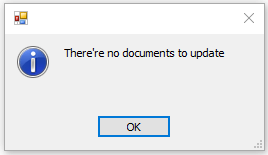
If the automatic check is enabled and no document parts has been modified, then the system will display the message below informing the user that the selected nodes don't need to be consolidated.
In the example above, the "FINANCIAL_STATE" node contains some lower elements (FACE_FINANCIAL) as well as an intermediate node (NOTES) with some lower level elements (NOTA_1, NOTA_2 e NOTA_3). If we need to update the entire section, the system will behave as follows:
- by default: it takes to the "FINANCIAL_STATE" level a copy of the content of the next lower level, namely it considers the "NOTES" intermediate node with the content it has on the basis of the last save and, if for some reason some sub-parts of the intermediate node have changed but the node has not been updated, the system inherits the content of the intermediate node on the basis of the last save, overlooking the modifications to the lower sections
- when the Recursive update option is enabled: it updates the intermediate nodes below the selected one and, if for some reason some sub-parts of the intermediate node have changed but the node has not been updated, by this options the system runs the update of the intermediate node before taking its content up to the "FINANCIAL_STATE" node
For further details about the other update options (Update formats, Reload structure, etc.), please see paragraph Update with options.