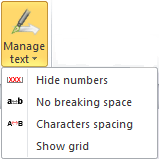
Manage text
The Manage text allows the users to perform some operations on the text. Specifically, it allows the user to:
- Hide numbers: hide the content of the numeric / percentage objects by replacing it with "XXX". Once clicked, the button remains highlighted. In order to restore the display of the numeric / percentage objects, it is necessary to click the icon
 again
again - No braking space: insert a no breaking space inside one or more selected words. This utility allows checking the line breaks in order to avoid to separate words you want to keep on the same line
- Characters spacing: open the window to modify the characters spacing of the selected text or for null characters (Only null characters option). In order to get the desired result, it is necessary to save the modification by clicking the OK button
- Show grid: Enable / disable the display of the grid on the document. This utility is useful to position the text and the objects with greater precision