Report
In order to have an overview of all modifications, all objects inserted, all bookmarks and the references of the selected document, it is possible to use the Report utility available in the "Utility" area of the "Tagetik" ribbon bar. Available utilities:
- Document objects
- Manual Adjustments report
- Bookmarks of the document
Document objects
The “Document objects” utility provides information about all the objects inserted into a document. By clicking on the "Document objects" button, the system opens a window containing a report of all objects existing in the Master document selected in the documents tree.
 The report runs independently of what document part (document activity) has been selected in the documents tree. The generated list shows all the objects of the Master document the selected lowest level element (or node) belongs to.
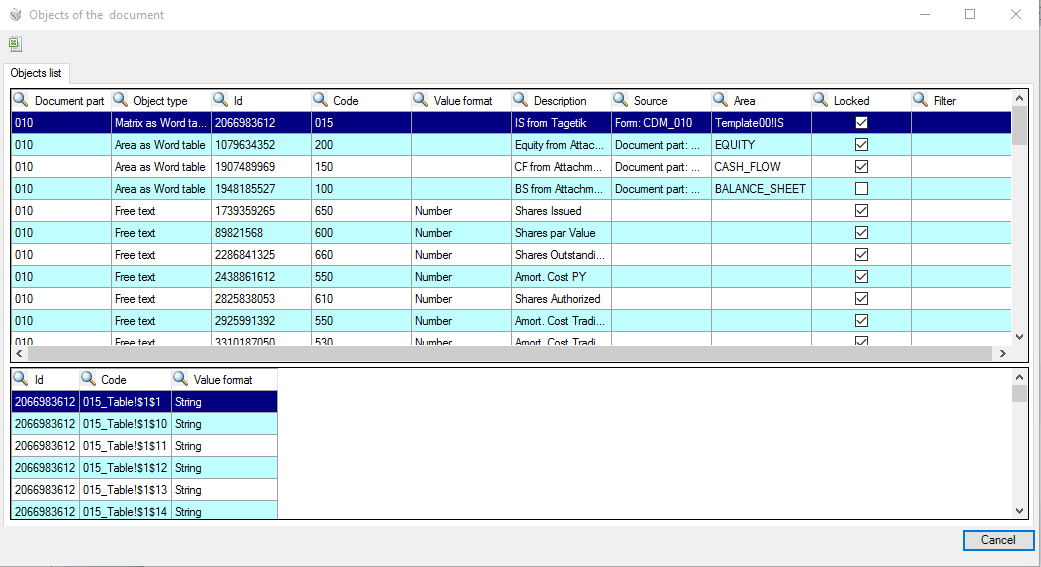
The window displays a chart showing the following information for each object:
- Document part: code of the document activity it belongs to
- Object type: object type (Cells, Tables, References, Images, etc);
- Id: ID code
- Code: code defined during the creation phase
- Value format: format (only for the "Cell" objects from Tagetik matrix or from Attachments, "References" and "Free text" objects)
- Description: description defined during the creation phase
- Source: the data source identified by:
- file code, for the objects from attachment;
- ID code, for those objects whose information comes directly from the database or from other parts of the document or from other documents;
-
form code, for objects from Tagetik report.
-
Area: area defined in Excel (for table objects from Tagetik matrix or Attachments)
- Locked: specifies if the "Lock object" option is enabled in the object's properties
- Filter: column showing any filters applied to the object. For example, in case of a “Matrix as Word table” object, it shows the filters overridden at matrix level which are not inherited by the document and, for the "Reference" objects, the field shows the Code ad Description of the referenced object.
For the cells of the table objects (both from Tagetik and from Attachment) the following details can be displayed at the bottom of the window:
- Id: ID code of the "Id oggetto_ Table!$NumeroColonna$NumeroRiga" cell
- Code: code of the "Codice oggetto_Table!$NumeroColonna$NumeroRiga" cell
- Value format: Cell format (text, number, percentage, etc)
Each column of the chart can be sorted ( ,
,  ) and filtered (
 ); moreover the content of the window can be downloaded by the button
  .
.
Manual Adjustments report
In order to get an overview of any change made by a user to the document, it is possible to use the "Manual Adjustments report" utility. By clicking on the button, the system runs a data processing at the end of which it will ask the user to save locally an Excel file containing all data related to the objects whose value has been overridden manually. The exported file will show the following information for each overridden object:
- Document Type: code of the Document type it belongs to
- Document: Code of the Document it belongs to
- Document Activity: code of the Document activity it belongs to
- Object type: object type (table cell, table, amount, etc)
- Description: description defined when creating the object
- Key: ID code of the modified object
- Value: object's original value
- Document Value: value of the object as shown on the document
- Manual override: override done by the user
- Override User: code of the user who run the override
- Override Date: date and time at which the override was run
Bookmarks of the document
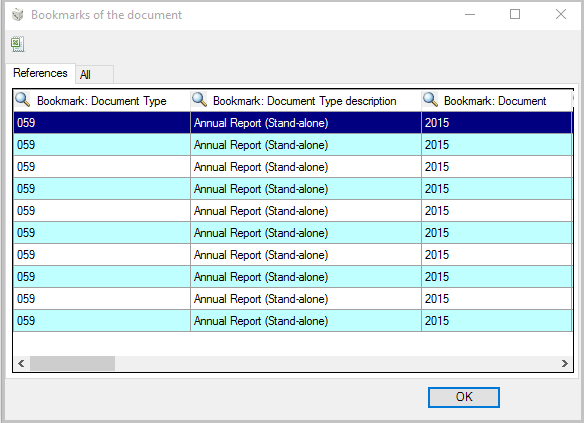
In order to get an overview of the bookmark objects and the references of the document selected in the documents tree (Master document or one of its child nodes) , it is possible to use the “Bookmarks of the document” utility. When you click on the related button, the system will open the window shown in the image below. The widow is made up of two tabs:
- References. It displays a table containing as many rows as bookmark objects contained in the selected Master document (or in its children) and for each row it shows on the columns some information regarding the bookmark object and the related reference
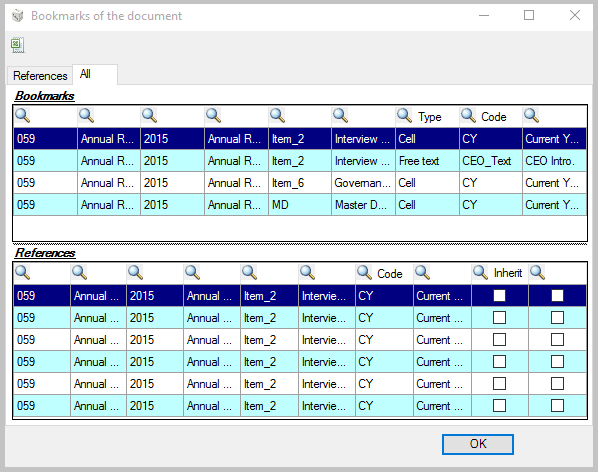
- All. It displays two tables containing, respectively:
- Bookmarks, all the bookmark objects contained in the selected document
- References, all the references that "point" to the selected bookmark object
Moreover, the Export to Excel utility in the top left hand corner of the window allows the user to download the widow's content to an Excel file.
To run the export, just click on the icon , enter a file name in the Export to excel dialogue window and a directory in which to save the file. When you click Save , the system will save the file in .xlsx format into the directory specified by the user.
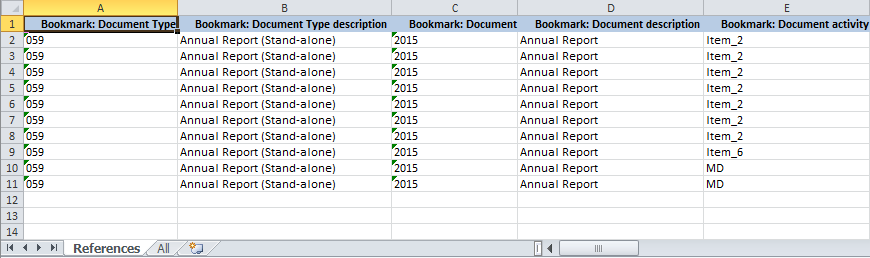
The exported Excel file contains two sheets, References and All, containing the elements displayed in the related tabs of the widow. If the bookmark object has been referenced by other reference objects, then the rows of the All sheet will display, below each row containing the bookmark, as many rows as Reference objects "pointing" to that Bookmark.