System
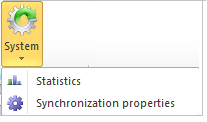
The System menu available in the Utility area of the "Tagetik" ribbon bar provides access to the following functionalities:
- Synchronization properties
- Statistics
Statistics
When updating a document, you may need to know the reason why the run-times are not as expected. For this purpose, Tagetik provides the user with a summary report (in Excel format) showing the time the system takes to perform all the operations required to collect data to display, to update the objects, etc. You can get this report by clicking on the  Statistics button available in the "Tagetik" ribbon bar.
This report is composed of two sheets:
- Tracer report. Shows the detail about the time the system takes to update the various objects within the document client side (Include, Header / Footer,...etc);
- Infos. Contains additional information (User Code, data processing Start / End date and time).
Synchronization properties
This is a technical functionality for massively saving the properties and the attributes of each Tagetik Object to the tables of the Database. Even though the system always saves those properties and attributes into the database when saving an object, in some cases, especially after updating a product, it can be necessary to massively save this information again by using the  Synchronization properties button available in the "Tagetik" ribbon bar.