Datasource AIH
The administrator must configure CPM in the Analytical Workspace > Virtual dataset and Datasource > Custom Query > Other DB folder.
The configuration uses the standard configurations of the AIH Datasources, for more details it is recommended to read the manual of the CCH Tagetik Analytical Workspace module. The following table contains some notes that can simplify the use of the datasources in the use of the SCP Modernization. In details, this tab configures the query (one for each DBMS platform) to define the Datasource. The syntax of the cell fields defines the parametric queries. You can also preview the query without saving it. You can use the current connection or select a specific DB if you have the necessary rights. The preview displays a temporary table with the data (max. 30) requested by the query.
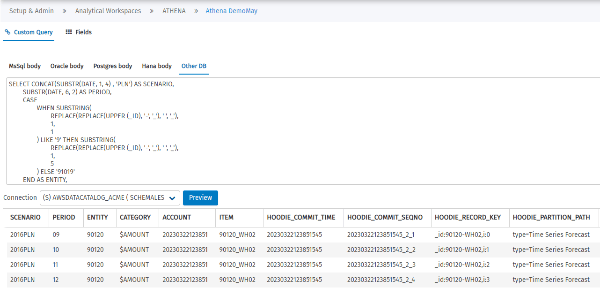
Example of Other DB tab on the Custom Query Screen
The configuration details for query tables assumption_vdb and assumption_vdb_data from Athena database are:
| Configuration Fields | Description |
|---|---|
| Connection | The secondary DB connection with the SCP data. |
| Query | Written in Athena SQL to retrieve data from SCP. See Appendix A. Query Example for SCP Data.sql. Notes: Fields that start with underline (‘_’, number and miscule) characters should be renamed with an alias. Rename the field if the name is locked in the CCH Tagetik database, i.e., I, DATE, TYPE, etc. The system architecture does not allow you to directly save a query from datasource select * from table, but only queries in which specific fields are called, for example, select field_a, field_b from table. The way to proceed for creating a datasource is this: 1. Select * from table to use as a “Preview” to see the fields that make up the table and the build Query Script in Athena language 2. Select field_a, field_b from table. Which is used to then be able to “Save” the query and use it as usual in datasets. |
| Fields | This tab lists all fields defined in the select statement list of the SQL query in the same order as in the select. For each field, you can: modify the description (multilingual wizard available in 25 languages — by default, it is equal to the label of the field) link it to a Tagetik dimension (only text fields — each dimension can be linked to only one field) define its roll-up (for numeric fields) You can also link it to a dictionary in the Worskpace, such as the fields of a standard dataset. Examples of dimensions available include: - Scenario - Period - Analytical dimension - Entity - Currency The Account, Category, and Custom Dimensions are not supported. |
| Patitioning policy | The two tables assumptions_vdb_data and assumption_vdb are partitioned to optimize the performance of queries within the database. Please find attached the logic: - assumptions_vdb_data, PARTITIONED BY scenario, - assumption_vdb, PARTITIONED BY plan The assumptions_vdb_data table there is the "partion" field that is filled in according to the id, which is split by the presence of the "-" character and only the first part is taken |
Query Example for SCP Data.sql
NOTE: The query reads from a secondary database connection that should be set into the datasource AIH. In addition, the SCP instance should be set into the FROM SCPinstance.table (i.e., FROM acme.assumptions_vdb)
QUERY FOR assumptions_vdb
SELECT
distinct
split_part (channel, '|', 2) as channel_code,
substr(cast(split_part (channel , ‘|’,1) as varchar),1 ,22) as channel_description,
split_part (ownercode_base , '|',1) as ownercode_base_code,
substr(cast(split_part (ownername_base , ‘|’,1) as varchar), 1,22) as ownername_base_description ,
_id as desc_code,
coalesce( split_part( split_part (part , '%',18), '7c',2), split_part (part, '|', 4) ) as Part_Source,
coalesce( split_part( split_part (part , '%',17), '7c',2), split_part (part, '|', 3) ) as Part_Type,
split_part (family, '|', 2) as family_code,
substr(cast(split_part (family , ‘|’,1)as varchar), 1,22) as family_description,
split_part (subfam, '|', 2) as subfam_code,
substr(cast(split_part (subfam , ‘|’,1)as varchar), 1,22) as subfam_description,
split_part (color, '|', 2)||'_C' as color_code,
substr(cast(split_part (color , ‘|’,1)as varchar), 1,22) as color_description,
coalesce(split_part(size, '|',2), split_part(size, 'c', 2)) as size_code,
substr(cast(split_part (size, ‘|’,1)as varchar), 1,22) as size_description,
split_part (style, '|', 2) as style_code,
substr(cast(split_part (style , ‘|’,1)as varchar), 1,22) as style_description,
coalesce( split_part (salesacct , '|',2), split_part (salesacct , '7c',2) ) as salesacct_code,
substr(cast(split_part(split_part (salesacct, '|', 1), '%', 1) as varchar), 1,22) as salesacct_description,
CAST ( SPLIT_PART(location,'|',1) AS varchar) as Location_type_code,
substr(cast(SPLIT_PART(location,’ |’,2) as varchar), 1,22) as Location_type_description,
CAST ( SPLIT_PART(location,'|',3) AS varchar) as Location_region,
CAST ( SPLIT_PART(location,'|',4) AS varchar) as Location_country,
REPLACE(REPLACE(REPLACE(CAST ( UPPER(SPLIT_PART(location,’ |’,5) ) AS varchar) ,’ ‘,”) , “,”), “, ‘_’) as Location_city,
segment,
SPLIT_PART(SPLIT_PART(segment,'|',1), '%', 1) as segment_code,
substr(cast( coalesce( SPLIT_PART (split_part (segment , ‘%’,1), ‘|’, 2), split_part(split_part (segment , ‘7c’,2), ‘%’, 1) ) as varchar), 1,22) as segment_description,
substr(cast( coalesce( SPLIT_PART (split_part (segment , ‘%’,1), ‘|’, 2), split_part(split_part (segment , ‘7c’,2), ‘%’, 1) ) as varchar), 1,22) as segment_description,
CASE WHEN UPPER(coalesce( SPLIT_PART (split_part (segment , '%',1), '|', 4) , split_part(split_part (segment , '7c',4) , '%', 1) ) ) = 'MIXED'
THEN CONCAT(coalesce( SPLIT_PART (split_part (segment , '%',1), '|', 3) , split_part(split_part (segment , '7c',3) , '%', 1) ) , '_', UPPER(coalesce( SPLIT_PART (split_part (segment , '%',1), '|', 4) , split_part(split_part (segment , '7c',4) , '%', 1) ) ))
ELSE UPPER(coalesce( SPLIT_PART (split_part (segment , '%',1), '|', 4) , split_part(split_part (segment , '7c',4) , '%', 1) ) )
END as segment_country,
coalesce( SPLIT_PART (split_part (segment , '%',1), '|', 3) , split_part(split_part (segment , '7c',3) , '%', 1) ) as segment_region
FROM tagetik_systemdemo.assumptions_vdb where plan = 'Sales'
QUERY GLOBAL TO MERGE assumptions_vdb, assumptions_vdb_data for CPM dimension elements inherited from SCP
SELECT
CONCAT(date_format(AA.date, '%Y'),'IBP_DM_CONS') AS SCENARIO,
date_format(AA.date, '%m') AS PERIOD, AA.partition as part_code, /*--dim */
SPLIT_PART(C.channel,'|',2) as channel, /*--dim */
SPLIT_PART(C.ownercode_base,'|',1) as ownercode_base, /*--dim */
SPLIT_PART(C.location,'|',1) as Location_code, /*--dim */
split_part (split_part (AA._id, ‘%’,1) , ‘-’, 2) as segment_code, /*--dim */
coalesce(cast(AA.actual_v as real), 0) as actual_v ,
coalesce(cast(AA.forecast_v as real), 0) as forecast_v ,
coalesce(cast(AA.stat_v as real), 0) as stat_v,
coalesce(cast(AA.baseline_adjustments as real), 0) as baseline_adjustments
FROM tagetik_systemdemo.assumptions_vdb_data AA
LEFT OUTER JOIN tagetik_systemdemo. assumptions_vdb C
ON C._ID = AA._ID
where C.partition = 'Sales'
and AA.partition = ${@$ANL_SKU_P.code}