Data Integration based on Datasource AIH
Quick Data Loader Settings
The administrator must configure CPM in the Analytical Workspace > Dataset > Datasource Mapping folder.
This tab defines the mapping of the Datasource to the field. The section on the left manages the data target mapping to be specified for the current dataset. The mapping code must be unique for each dataset. The Source Type indicates the location of the Datasource.

The following details vary with the source of extended integration:
Analytical Workspace
Datasource must refer to a database the User is allowed to access. The Datasource is set according to the Integrated Reporting Manual. It contains the query in the other DB and the secondary connection.
Type
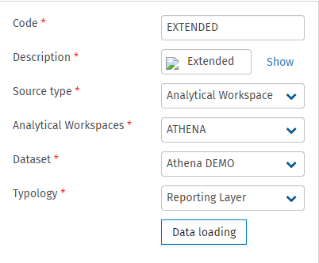
Data Integration: QDL and/or DTP
Datasource mapping can be used for the following:
The Datasource mapping can run using QDL in Workflow. It loads the data in a dataset of an Analytical Workspace according to the configuration of QDL and puts it into the workflow according to the Tagetik standard feature. The Dataset mandatory setting selects a dataset of the Analytical Workspace and specifies a logical set of data from the dataset.
The Datasource mapping can run using DTP with Upload to an Analytical Workspace operation. The Loading to Analytical Workspace operation fills in one or more fields of a target dataset from another source using the Loading data from external Datasources into Analytical Workspace data processing defined in a Quick Data Loader - Datasource mapping page.