User Management for SCP Users to Access CPM
Custom Roles
The Repository allows to manage user action limitations within the Supply Chain Planning module. They are managed through four dedicated custom roles. These roles are included by default upon the initial installation of the Supply Chain Planning module:
- $SCP_ADMINISTRATOR
- $SCP_POWERUSER
- $SCP_VIEWER
- $SCP_OWNER
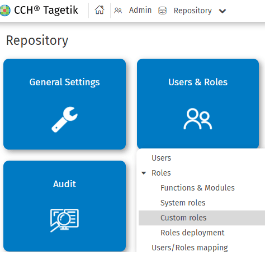
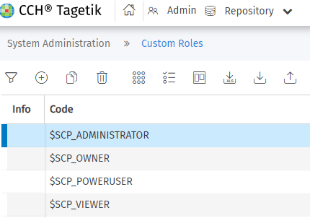
User action limitations within the Supply Chain Planning module are governed by a set of dedicated functions that define what users assigned to specific roles can do. These functions are contained within the module named "SCP_USER". Functions assignment to individual roles are preconfigured by default during the initial installation, but they can be adjusted based on configuration needs by the user managing the module.
Associating a role with a user determines which actions they can view and access, as well as which behaviors they are allowed to perform. It is possible to modify the assignment of a role to a user, or change the assignment of multiple roles to a single user.
Functions
The functions assigned to roles for the Supply Chain Planning module can by adding or removing from the predefined Supply Chain Planning roles. Dedicated functions have been created to manage the Supply Chain Planning process. These functions are assigned to default user roles upon initial installation, but their assignment can be modified.
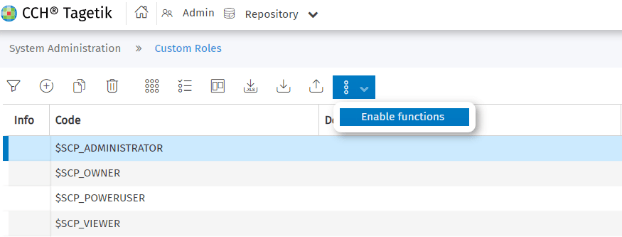
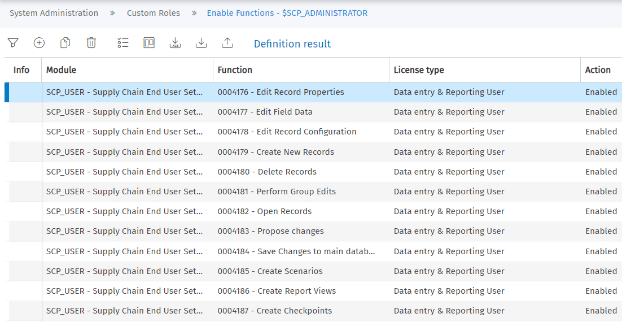
The table below lists the main functions required to enable the use of the Supply Chain Planning module, along with their description and the default roles to which they are assigned:
| Function | Function - Description | Description | User assignment |
|---|---|---|---|
| 0004189 | Access Administration Tab | Settings ABC Calculation Rules | $SCP_ADMINISTRATOR |
| 0004189 | Access Administration Tab | File Manager visualization | $SCP_ADMINISTRATOR |
| 0004189 | Access Administration Tab | Data Integration page visualization | $SCP_ADMINISTRATOR |
| 0004189 | Access Administration Tab | Data Integration log visualization | $SCP_ADMINISTRATOR |
| 0004189 | Access Administration Tab | Data Integration task visualization | $SCP_ADMINISTRATOR |
| 0004189 | Access Administration Tab | Settings CPM-SCP Configuration visualization | $SCP_ADMINISTRATOR |
| 0004189 | Access Administration Tab | Task Management visualization | $SCP_ADMINISTRATOR |
| 0004189 | Access Administration Tab | Design -> Supply Chain Planning visualization | $SCP_ADMINISTRATOR |
| 0004182 | Open Records | Data processing task SCP enabling via workflow | $SCP_ADMINISTRATOR, $SCP_OWNER, $SCP_POWERUSER, $SCP_VIEWER |
| 0004182 | Open Records | Settings task SCP via workflow configuration | $SCP_ADMINISTRATOR, $SCP_OWNER, $SCP_POWERUSER, $SCP_VIEWER |
| 0004182 | Open Records | Scenarios SCP visualization | $SCP_ADMINISTRATOR, $SCP_OWNER, $SCP_POWERUSER, $SCP_VIEWER |
| 0004182 | Open Records | Data integration pipeline execution | $SCP_ADMINISTRATOR, $SCP_OWNER, $SCP_POWERUSER, $SCP_VIEWER |
| 0004149 | Supply Chain Planning - Athena Datasource | Data processing task SCP enabling via workflow and Integrated Reporting SCP enabling via AIH Datasource | $SCP_ADMINISTRATOR, $SCP_OWNER, $SCP_POWERUSER, $SCP_VIEWER |
| 0004194 | Initiate Other Tasks | Data processing task SCP execution via workflow | $SCP_ADMINISTRATOR |
| 0004136 | Supply Chain Planning - Home Page User | Tile access SCP via Legacy UI in CPM | $SCP_ADMINISTRATOR, $SCP_OWNER, $SCP_POWERUSER, $SCP_VIEWER |
The functions that manage the standard behavior of the Supply Chain Planning module have been included in the repository to enable centralized management of module behavior. Below the list of the standard functionalities of the Supply Chain Planning module, along with details of the functions that are deprecated for use within the Supply Chain Planning process on Tagetik platform:
| Function | Function - Description | Description |
|---|---|---|
| 0004197 | Access System Setup Functions | Deprecated on SCP embedded in CPM |
| 0004176 | Edit Record Properties | SCP Core default behavior |
| 0004177 | Edit Field Data | SCP Core default behavior |
| 0004178 | Edit Record Configuration | SCP Core default behavior |
| 0004179 | Create New Records | SCP Core default behavior |
| 0004180 | Delete Records | SCP Core default behavior |
| 0004181 | Perform Group Edits | SCP Core default behavior |
| 0004182 | Open Records | SCP Core default behavior |
| 0004183 | Propose changes | SCP Core default behavior |
| 0004184 | Save Changes to main database | SCP Core default behavior |
| 0004185 | Create Scenarios | SCP Core default behavior |
| 0004186 | Create Report Views | SCP Core default behavior |
| 0004187 | Create Checkpoints | SCP Core default behavior |
| 0004188 | Create Custom Reports | SCP Core default behavior |
| 0004191 | Access Job Manager | Deprecated on SCP embedded in CPM |
| 0004192 | Initiate Import | SCP Core default behavior |
| 0004193 | Initiate Checkpoint | SCP Core default behavior |
| 0004194 | Initiate Other Tasks | SCP Core default behavior |
| 0004195 | Upload Data Files | SCP Core default behavior |
| 0004196 | Download Data Files | SCP Core default behavior |
| 0004198 | Load Records Owned by Others | SCP Core default behavior |
| 0004199 | Edit Records Owned by Others | SCP Core default behavior |
| 0004201 | Initiate Export | SCP Core default behavior |
| 0004190 | Access User Manager | SCP Core default behavior |
| 0004182 | Open Records | SCP Core default behavior |
Roles Deployment
To apply the configuration, after each modification to the assignment of a function to a role, it is necessary to perform a Role Deployment to update the alignment. Once the operation is completed, users assigned to the modified role must access a Supply Chain Planning page. This allows the Single Sign-On mechanism to refresh the user's configuration and apply the changes effectively.