Configure the SCP Virtual Field for CPM Queries
The SCP Virtual Field provides a user interface control to determine if a virtual field data is available for CPM queries through the data integration pipeline. This user interface is located on the SCP Setup screen with other Virtual Properties.
A subgroup of virtual fields cannot be included in CPM queries for security reasons, so the user interface is locked. For virtual fields that can be queried by CPM, an Administrator can enable CPM query access from the Virtual Field Properties screen. This allows visibility of CPM query data.
To configure SCP Virtual Fields for CPM Qqueries
- Access the SCP Setup screen.
- Locate the Virtual Field tab.
-
From the CPM Export column, look for the lock icon.
-
If lock icon is visible, the virtual field is not available for CPM Queries.
- If lock icon is not visible, the virtual field is available for CPM Queries.
- Select the virtual field to see the properties.
Edit Property Screen
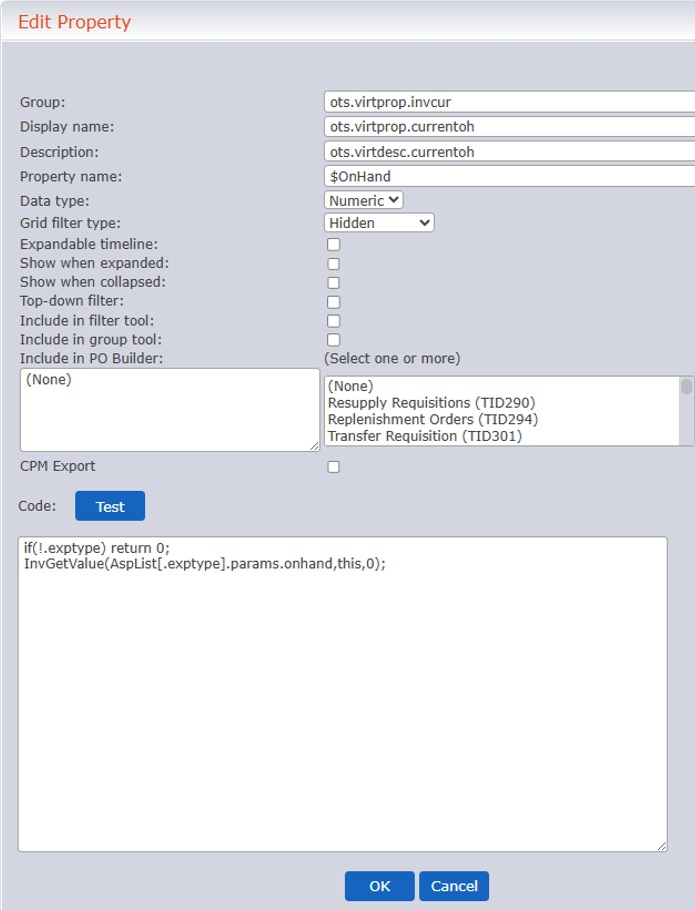 5. Mark the CPM Export checkbox.
6. Click OK.
7. Click the Save (
5. Mark the CPM Export checkbox.
6. Click OK.
7. Click the Save ( ) to save changes to the database.