Headers tab
Excel > CCH® Tagetik >  Design > select form >
  Matrix > Headers
Purpose of the tab
This tab allows you to customise the row and column headers of the matrix using predefined headers in order to make it easier to read the data in the table.
What it looks like
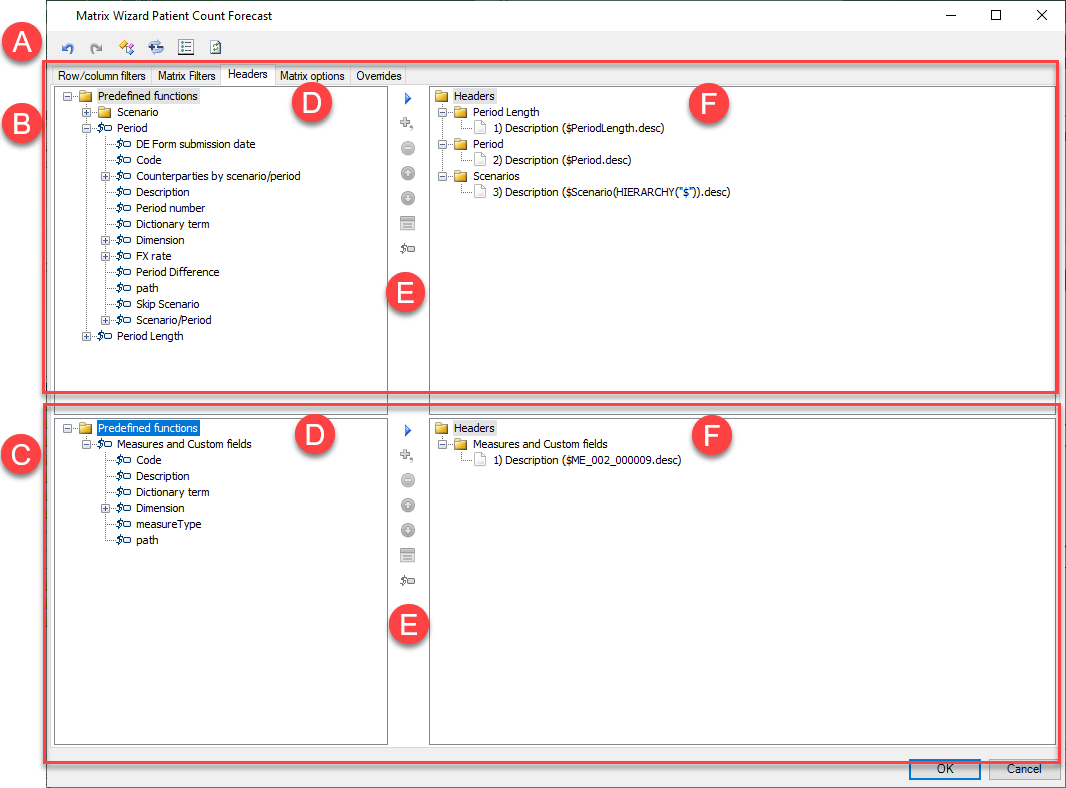
| Element | Description |
|---|---|
| A | Action buttons in all tabs. See Configuration window structure. |
| B | Row headers section |
| C | Column headers section |
| D | List of available headers |
| E | Buttons specific to the tab |
| F | List of defined headers |
Areas of row/column header sections
| Element | Description |
|---|---|
| List of predefined headers | Displays the list of predefined headers, indicated by . |
| List of defined headers | Displays the list of defined headers. Every defined header presents the following information: - matrix row/column number on which the header is defined - text shown in the matrix headers |
Buttons in tab
| Element | Description |
|---|---|
| Adds one or more selected predefined headers to the list of defined headers. | |
| Adds, through concatenation, one or more selected predefined headers to a header that has already been defined. In the matrix, such headers are shown as a concatenation. | |
| Only with headers already defined. Removes one or more selected headers from the list of defined headers. | |
| Only with headers already defined. Moves the selected header up one position. | |
| Only with headers already defined. Moves the selected header down one position. | |
| Only with headers already defined with a OR logical function. Allows you to remove or reorganise one or several headers of a group of concatenated headers with the OR logical function. | |
| Opens the Cell Fields Wizard. See Cell Fields Wizard. |