Dynamic matrices
What they are
In matrices, it is always possible to change certain properties of filter nodes to make them dynamic. Thus, it is possible to take account of how the composition of the nodes changes over time without having to edit them in the matrix. These matrices have a variable row and column structure, which is calculated at runtime when the form is run. The system recovers the indicated node, considering all elements contained within it when the form is run. For example, in a matrix with an account of the sales of products over the month, creating a dynamic matrix allows you to retrieve, when the form is run, dimensional data on the desired products and period without having to define them manually as filters in the matrix.
It is also possible to set only some of a matrix's elements as dynamic, even if they belong to the same dimension.

IMPORTANT: in dynamic matrices, elements inserted as dynamic row/column filters have Insert lowest level elements as their default selection type on creation. This setting can be changed.
Selection type
This property allows you to define the dynamic element that must be shown depending on the various levels of the selected hierarchy.
Example
This example shows a hierarchy on the entity dimension that groups entities by geographical area, where the subsidiaries are lowest level elements (leaf elements) while regions are aggregations of elements (node elements).
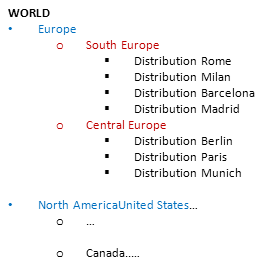
Dynamic forms can be constructed to see several entities based on the selected node. If the node inserted as a row filter is Europe, the following results are obtained based on the selected selection type:
| Advanced selection | Outcome |
|---|---|
| Insert Parent | At runtime, the parent node of the element indicated as the filter is inserted, so the matrix only shows the row corresponding to the node of the WORLD hierarchy containing the total of all nodes below it. |
| Insert children | At runtime, all the rows corresponding to the child nodes of the node indicated as the filter are inserted, so the matrix only shows the rows corresponding to the South Europe and North Europe nodes, containing the relative subtotals. |
| Insert lowest level elements | At runtime, all the lowest level elements of the node indicated as the filter are inserted, so the matrix shows the rows corresponding to the lowest level elements, and therefore Distribution Rome, Distribution Milan, Distribution Barcelona, Distribution Madrid, Distribution Berlin, Distribution Paris and Distribution Munich. |
IMPORTANT: If advanced selection is applied to a hierarchy of time-dependent elements, the scenario and period must be determined unambiguously. The scenario and period elements must therefore be inserted either in the matrix, in the filters themselves (row or column) but above the dynamic elements, or in the form filters.