Matrix Filters tab
Excel > CCH® Tagetik >  Design > select form/create new form >
  Matrix > Matrix Filters
Purpose of the tab
This tab allows you to define filters on dimensions that are valid over the entire matrix.
What it looks like
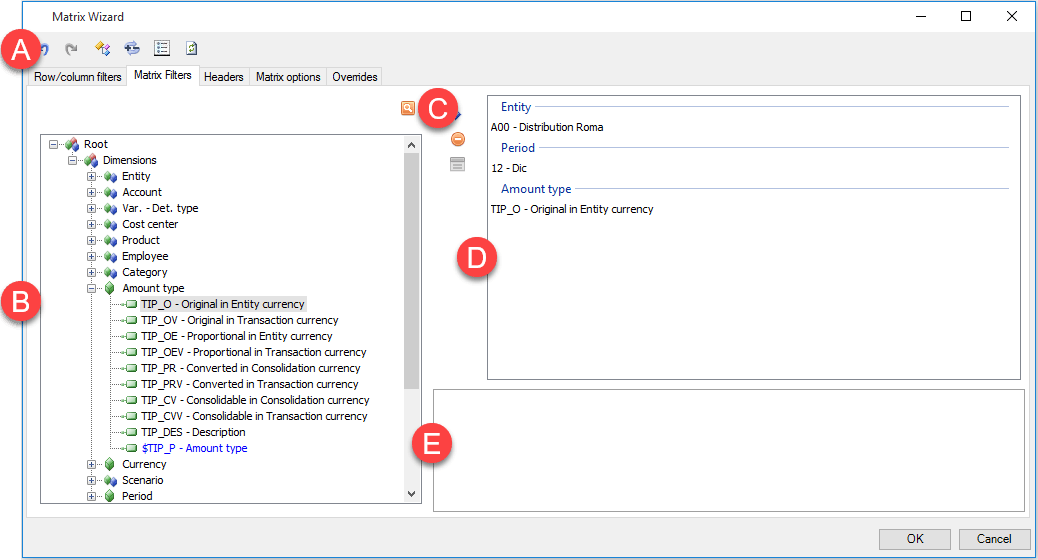
| Element | Description |
|---|---|
| A | Action buttons in all tabs. See Configuration window structure. |
| B | Dimensions tree |
| C | Buttons specific to the tab |
| D | Matrix filters definition area |
| E | Table of properties of the selected element in the definition area |
Tab sections
| Element | Description |
|---|---|
| Dimensions tree | Show the list of available dimensions. - system dimensions (scenario, period, account, entity...) - custom dimensions (custom dimensions: e.g. products, cost centres...) - specific reporting dimensions (e.g. period length) |
| Matrix filters definition area | Show the list of filters set on the matrix. |
| Properties table | - Allows you to manage the editable attributes of the selected dimension or filter. |
Buttons in tab
| Element | Description |
|---|---|
| Adds one or several elements or nodes selected in the dimensions tree to the matrix filters definition area. | |
| Only with filters with the OR function already defined. Removes one or more elements from filters defined as OR clauses. This button is only activated when matrix filters with the OR logical relationship have already been defined. | |
| Removes the selected filter. |
Properties table
| Element | Description |
|---|---|
| Expands a set of details which change a filter property. | |
| Expands the list of possible values for the property. | |
| Opens the property configuration window. |
For details of the possible options in relation to properties, see Matrix filter properties.