Process Page
 User
User
Application database > Processes tile
Application database > Navigation panel > Processes & Workflow > Process
Purpose of the page
This page shows a list of all the processes configured. They are grouped by active, blocked and archived processes.
For each process, it shows the name and progress of the submission of each step, depending on the user rights. For processes with cycles by "Scenario/Period", you can choose the scenario/period to manage.
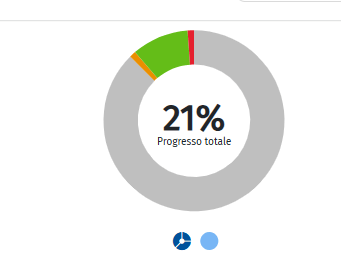
The Donut Chart is available for new processes, showing the progress status of tasks in the central part, as well as all the elements of the process steps.
Actions on this page
| Element | Description |
|---|---|
| Active | Shows only active processes, i.e. those that have at least one unlocked scenario/period not archived that is visible to the user. |
| Locked | Shows only locked processes, i.e. those that have at least one locked scenario/period archived that is visible to the user. |
| Archived | Shows only archived processes, i.e. those that have at least one archived scenario/period that is visible to the user. |
| Status report | Opens the Status Report window. |
| Open Process | Opens the process cockpit for the selected process. Note: the last position worked on in the same work session is maintained, by organisational/hierarchy dimension. |
| Opens the process cockpit directly in the tab relating to the selected step. Note: the last position worked on in the same work session is maintained, by organisational/hierarchy dimension. |
Step submission status
| Element | Description |
|---|---|
| The step is not significant for the element. No activity available or requested for the element. | |
| No activity carried out on the element | |
| Data collection and submission activities in progress | |
| Submitted element. All data is submitted and locked. | |
| Rejected element after submission. Other data can be entered. | |
| Approval process not completed. For example, the submission task was performed and only one of the two approval tasks was performed. |