Transfer Logs page
Repository > Configuration Deployment Tool > Transfer Logs
Page purpose
This page shows a summary grid of the transfers, in chronological order. For each transfer, the following data is shown:
- Date/time of transfer
- Source Environment
- Source Application
- Target Environment
- Target Application
- Transfer Info
- User who performed the transfer
- Transfer Status
- Date of any rollback
- User who run the rollback
- Rollback status
- Available Actions
What it looks like
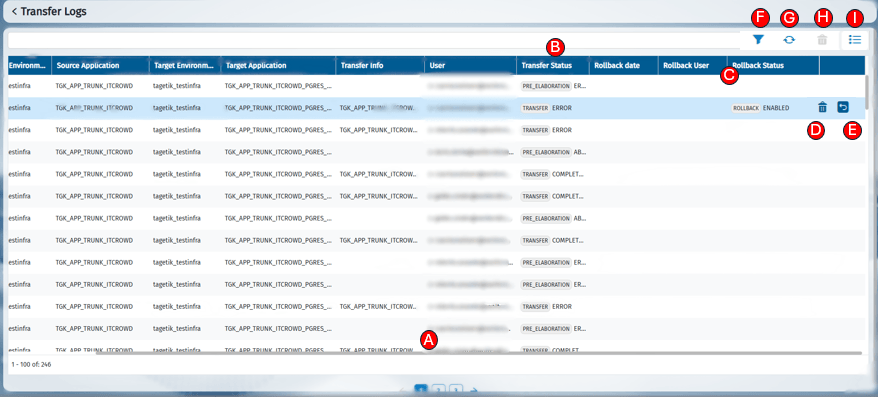
Elements on the page
Below are the functions of the page elements:
| LETTER | ICON | ELEMENT | FUNCTION |
| A | Transfer Logs Grid | Shows the list of transfers performed or in progress. Each row represents a transfer. | |
| B | 'Transfer Status' column | It displays the current status of each transfer and provides the option to view its details (see Transfer Page | |
| C | 'Rollback Status' Column | Shows the outcome of any rollbacks associated with the transfer and allows you to open the relevant details(see Transfer Page) | |
| D | Single Delete button | Enables deletion of the selected record. It is not possible to delete data processes that are currently running, or the last transfer performed for the same target. | |
| E | Rollback (Play) button | Rollback is enabled only for the most recent transfers performed with the same target and with no deletion policy set. | |
| F | Filter button | Applies filters for a more precise search within the table | |
| G | Refresh button | Updates the table | |
| H | Multiple Deletion Button (DELETE ALL) | Allows the deletion of selected records. It is not possible to delete data processes that are currently running, or the last transfer performed for the same target. | |
| I | Multiple selection button | Enables the selection of multiple rows, required to activate the H button |