System administration page
Introduction
Most of the pages on which system administration activities are carried out follow a shared logic. The main features are detailed below.
What it looks like
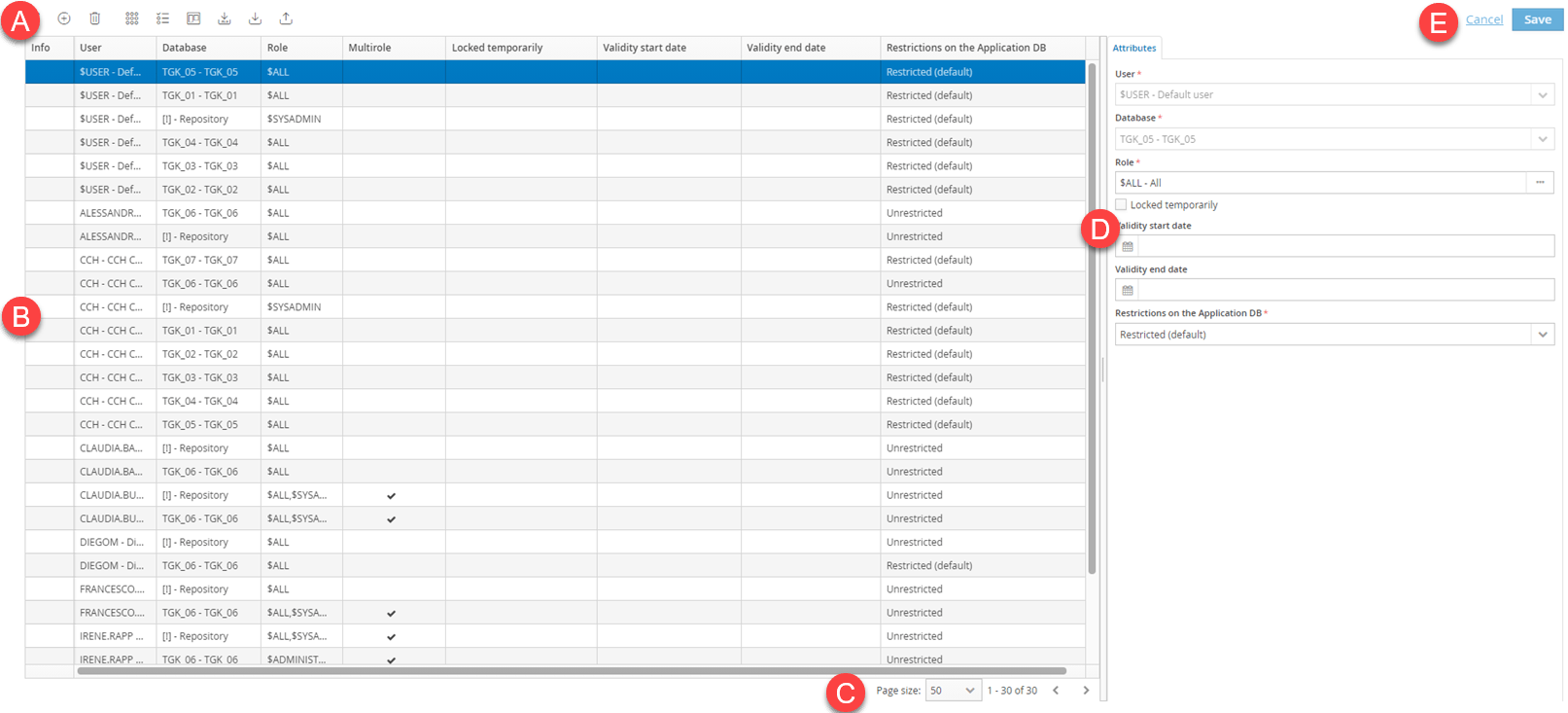
| Element | Description |
|---|---|
| A | Tool bar with action buttons on the page |
| B | Table of specific data for the page (e.g. user list, data processing list, etc.) |
| C | Page size and scroll buttons |
| D | Configuration tab for data shown in the table (e.g. Attributes, Notifications etc.) |
| E | Any other action buttons |
Buttons on the page
The following buttons are repeated on the system administrator work pages:
| Element | Description |
|---|---|
| This filters the data shown on the page. | |
| Adds a row in order to insert a new element. | |
| Duplicates the selected row and its content, except for the code. | |
| Deletes the selected row in the table. | |
| Activates/deactivates the edit function in the table directly and hides the configuration tabs. | |
| Enables multi-row selection to allow mass changes. | |
| Selects the columns to be shown/hidden in the table and those to be locked when scrolling the table. | |
| Exports data in Excel format. This file cannot be re-imported into CCH Tagetik. | |
| Exports the data in Excel format so they can be edited and reimported into CCH Tagetik. | |
| Imports data from a previously prepared Excel file. | |
| Cuts a row so it can be pasted elsewhere. | |
| Moves a cut row elsewhere. | |
| Shows a number of actions that can be run on the selected data. |