Objects library
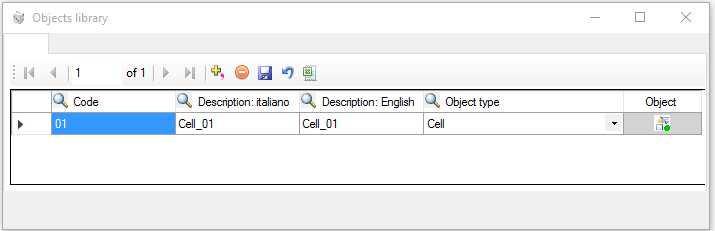
With the Objects library utility it is possible to define and register a set of objects with predefined filters that can be used as a template when creating the various parts of the document.
In order to define a library for a document , it is necessary to select the document from the documents tree and then access the  Objects library utility available on the "Tagetik" ribbon bar. In order to add a new object into the library, you just have to click on the
  Add New Item button and then define:
- Code. ID code of the object
- Description. Object's description
- Object type. Type of object (Cell, Table, etc..)
- Object. Object to use as a template. By clicking on the icon
 it is possible to open the object definition window in which you can define the properties and set the filters according to the selected type
The defined object will be registered into the library by using the  Save button available on the toolbar of the "Objects library" window.
The library defined for the document can be displayed in the Objects library tab available in the "Documents management" panel after opening the document or a document part. The tab shows all library's objects divided by object type. In order to insert an object of the library into the opened document activity, just select the object and then use the "drag selection" or "insert" function in the current position.