Send Mail
In CCH® TagetikCollaborative Office it is possible to set the automatic sending of emails when specific events occur. For each event the notifications can be sent to one recipient or to a list of recipients. The events after which the automatic email can be sent are predefined by CCH® Tagetik and they are:
| Event | Description | Recipients |
|---|---|---|
| Replace attachments | The email is sent at the end of the specified data processing | There isn't a list of default recipients. The list of recipients must be manually specified in the rule |
| Create snapshots automatically | ||
| Schedule send reminder e-mail | The email is sent according to the Advance notice days inserted upon scheduling | Managers of the document part |
| Submit part | The email is sent when a part is submitted | Parametrizers, Contributors, Submitters or Approvers of the document Users of the document part Users of the parent part of the document part |
| Approve part | The email is sent when a part is approved | |
| Reject submitted part | The email is sent when a submitted part is rejected | |
| Generic event | To be used when it is necessary to send an email for communications like: "Access website... " or "Before proceeding, see Report Y". | Parametrizers of the documents Users of the following generic tasks present in the workflow related to the document part |
| Close part | Then email is sent upon completion of a document part | Parametrizers, Contributors, Submitters or Approvers of the document Users of the document part Users of the parent part of the document part |
| Modify the attributes of the document's header | The email is sent when the attributes of the master document are modified | Users that use the document in write mode |
| Edit data in a document part | Managers of the modified document parts |
The emails are sent by the Simple Mail Transfer Protocol (SMTP) service. In Tagetik the emails can be sent via:
- Mail Session Application Server. In this case:
- the system will use the SMTP session configured in the application server;
- the sender of all emails will be the one set in the "mail.from" property name present in the xml configuration file
- Mail Session Custom. In this case:
- the system will use the SMTP session set up through the Repository configuration;
- the sender of the email is defined by the system according to the value of the "Mail From" parameter available in the Repository configuration. In particular, if this parameter is:
- Unique the system fills the From field of the email with the email address specified in the "Default Mail From" field;
- Userthe system fills the From field of the email with the email address specified in the users table
 When the Audit: Send Mail option available in the Auditing tab of the Repository configuration is enabled, it is possible to make the system register in the audit log the automatic sending of the emails.
E-mail templates
The configuration of the send mail rules can be accessed from the Admin Home Page by clicking on the Collaborative Office > E-mail templates tile.
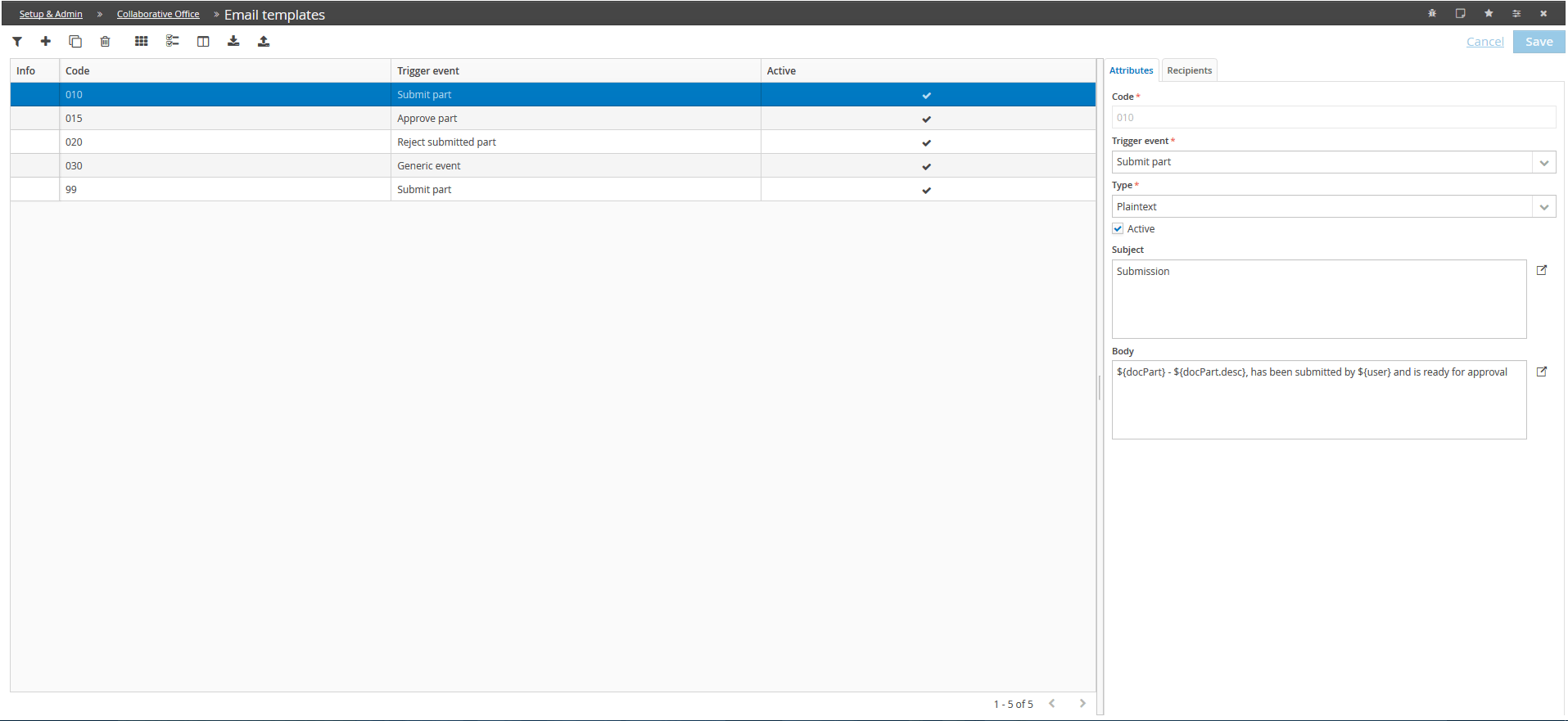
Attributes
A Send mail rule is identified by:
- a code
- an Email event type which identifies the event after which the automatic email is sent. The event types are precoded by Tagetik
- a text typewhich specifies if the text of the email is formatted according to the Html specifics (in this case hyperlinks can be included in the body of the email) or is in plain text;
- an Enableoption to temporarily disable the rule;
- an Object
- a Textnamely the body of the email
Parametric parts of text can be inserted into the object in order to refer the value of the input filters of the event which has generated the automatic email. For the complete list of referable elements, see Parametric elements which can be inserted into the object/text of the email
Recipients
For each Send mail rule, it is possible to define three different list of recipients:
- User types (A)
- User types (Cc)
- User types (Ccn)
Basing on the event type, the system suggests some "specific recipients", namely types of users that meet specific requirements in relation to their profiling. Moreover, it is possible to define a specific list of users (Add) or delete a specific list of users (Delete).
 Once the parametrization of the send mail rules is completed, in order to enable it within the Collaborative Office module, it is necessary to set the Send e-mail option to Standard in the Document Type definition window.
Parametric elements which can be inserted into the object/text of the email
Tagetik allows you to insert some parametric parts of text into the object and into the body of the email in order to refer the value of the input filter of the event which has generated the automatic email.
In detail those parameters are:
- For all events types:
- ${docType} - Document type code
- ${docType.desc} - Document type description
- ${documento} - Document code
- ${documento.desc} - Document description
- ${docPart} - Document activity code
- ${docPart.desc} - Document activity description
- ${remainingDays} - Inserts the number of days left before expiration
- ${user} - Inserts the name of the user who will have to fill the section
- ${approvers} - Inserts the name of theh user who will have to approve the section
- For the "Schedule send remainder e-mail" events:
-
${dataScadenza} - Date by which the document must be closed
-
For the "Modify the attributes of the document's header" event:
- ${user} - Code of the user who has made the last modification and an attribute of the document's header
- ${editedAttributes} - List of the attributes modified in the document's header. The list is displayed as a bullet point list