Activity Log
The Activity Log window shows all the information related to the activities run on the parts of a specific document, in a more understandable way than in the application audit. Such information does not only concern the steps of the Task Flowchart (generic activity, submission, rejection, approval) but also all the saves run on each part of the document, including the modifications made to the values of each object.
The widow can be accessed from the Administrator home page by clicking on the Utility > Activity Log tile. The system will open a filter window, in which it is necessary to specify the Document type and the Document for which you want to display the information, and then opens the Activity Log window.
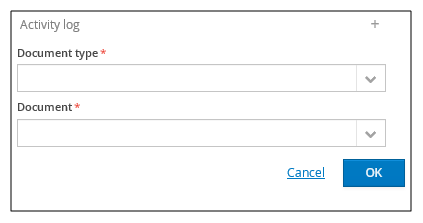
The report is a simple list that can be filtered and ordered on all the columns displayed :
- Date of the activity
- User that run the activity
- Document part
- Action (Generic activity, Data Entry, Submission, Approval, Rejection, Save)
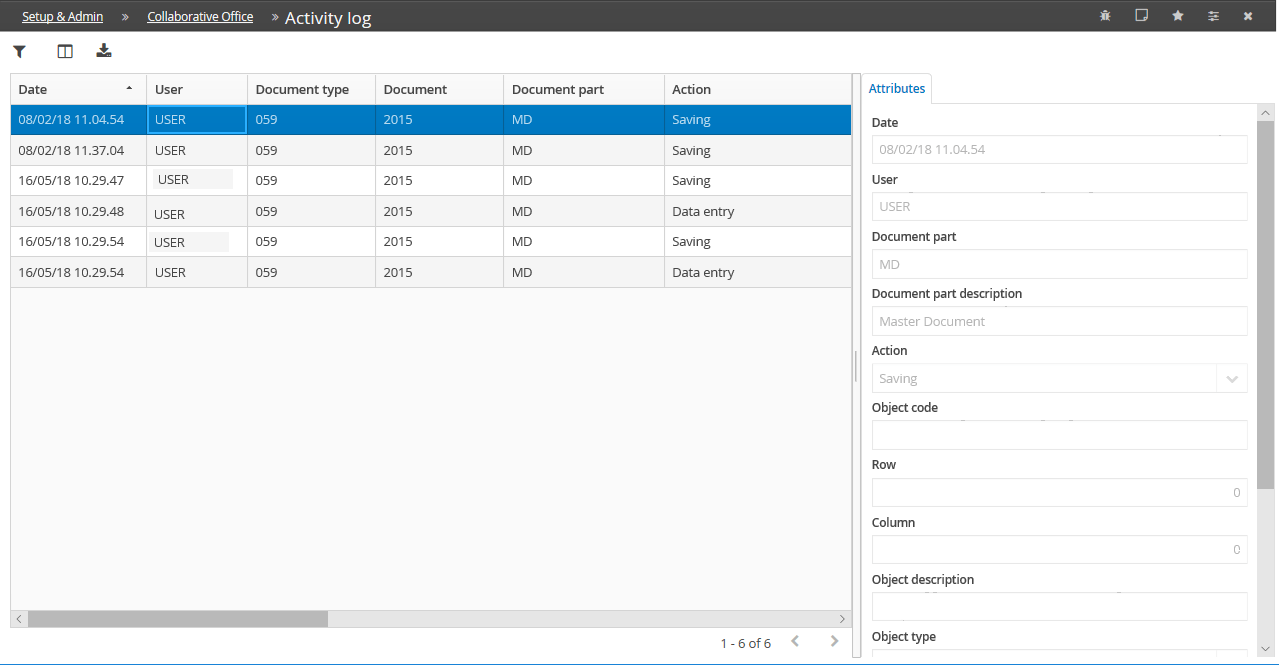
Moreover, only for the actions related to the save, the following columns are displayed:
- Code and Description of the modified object
- modified Object type
- Row and Column with a table's "Cell" object type
- Action on the object (Insertion, Deletion, Edit value)
- Value of the object: defined only for Action on the object equal to "Edit value"
- Previous value of the object: defined only for Action on the object equal to "Edit value"
- Manual edit: specified if the current value has been modified by the user and, therefore, does not result from the reading of data of the various sources