Structure of data page
All the data pages on which the user can work have a structure similar to the one described below.
What it looks like
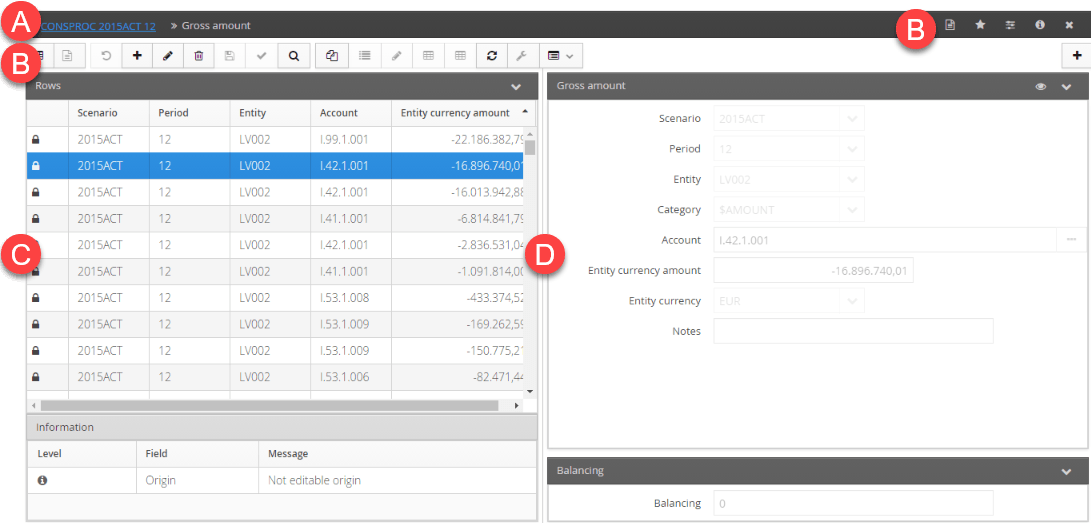
| Element | Description |
|---|---|
| A | Navigation bar. Name of page and pathway |
| B | Action buttons |
| C | Data table |
| D | Area showing details of selected data |
Action buttons
There are various buttons depending on the type of page and user. Below is a list of frequently-used buttons:
| Element | Description |
|---|---|
| Allows you to insert notes or specific attachments for the page. | |
| Includes the page among Favourites, which can be entered on the home page. Blue, if the page is already included in Favourites. | |
| Saves the page’s current display settings (such as visible columns). | |
| Closes the current page. | |
| Exports data in Excel format. This file cannot be re-imported into CCH Tagetik. | |
| Exports the data in Excel format so they can be edited and reimported into CCH Tagetik. | |
| Imports data from a previously prepared Excel file. | |
| Displays a list of available reports for the page. | |
| Adds a row in order to insert a new element. | |
| Allows you to modify a current element. | |
| Deletes the element contained in the selected row. | |
| Validates the data entered. | |
| Filters the data displayed on the page. | |
| Copies the selected element. | |
| - Enables/Disables the grid modify function. - Allows you to change the characteristics of the selected elements directly in the table. - Shows/Hides the configuration tabs. | |
| Enables multi-row selection to allow mass changes. | |
| Selects the columns to be shown/hidden in the table and those to be locked when scrolling the table. | |
| Shows different ancillary functions. | |
| Shows a number of functions that can be run on the selected data. | |
| Cuts an item so it can be pasted elsewhere. | |
| Moves a cut item elsewhere. | |
| Enables/Disables the indicated function. | |
| / | Expands or compresses the sections. |
| Links to other pages | |
| Cancel | Cancels unsaved changes. |
| Save | Saves changes made to data on the page. |
Status of data table items
The first column in the data table indicates the data processing status.
| Status | Description |
|---|---|
| Data added to current session and not yet saved. | |
| Data marked for deletion at the time of saving. | |
| Data modified in current session and not yet saved. | |
| Data locked, cannot be modified or deleted. | |
| Critical error which prevents the data from being saved. |
Status of data validation
The status of the table data may be indicated by a coloured dot or label.
| Status | Description |
|---|---|
| /OK | Data valid |
| /~ | Data valid, but with non-critical errors |
| / | Data invalid due to critical errors |
| / | Data cannot be modified |