Home page - Repository
 Admin |
  Repository

IMPORTANT: the functions available will depend on the user’s role and the activated licence.
What it looks like
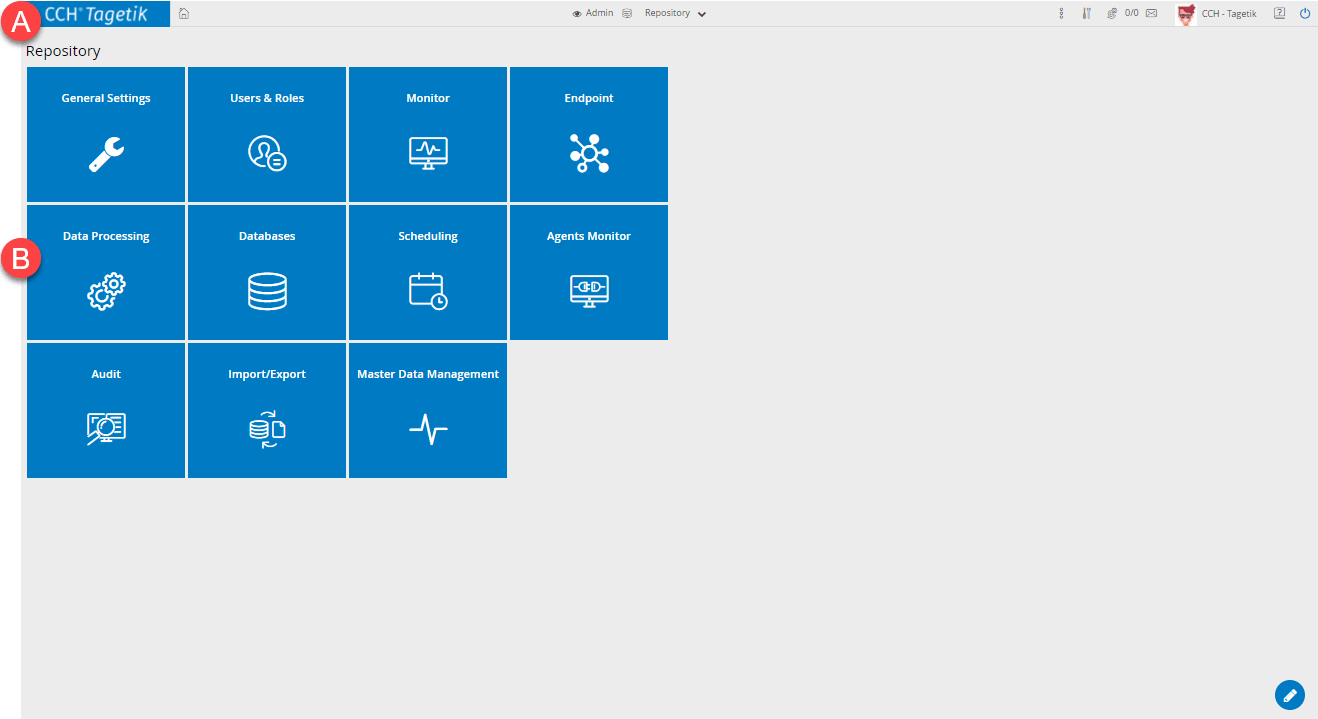
| Element | Description |
|---|---|
| A | Main tool bar |
| B | Available functions |
Available functions
| Function | Description |
|---|---|
| General Settings | Displays the list of the generic configuration functions of Tagetik. |
| Users and Roles | Displays the list of configuration functions for the users and roles of Tagetik. |
| Databases | Displays the list of connected databases and admin functions. |
| Data Processing | Opens the configuration page for available data processing operations. |
| Import/Export | Displays the list of the database import and export functions. |
| Monitor | Displays the list of functions related to users logged on to Tagetik, server status, processes running and log level. |
| Scheduling | Opens the scheduling page. |
| Master Data Management | Allows access to pages to manage routines and transfer settings from one environment to another. |
| Audit | Allows consultation of application logs. |