Record Fields
Each record in the database has fields attached to the record; and each field has properties attached to the field. This section describes those fields, where you will see those fields, and how they can be used in a record.
Mod The modified field identifies files that have been changed (S means the record needs to be saved), records that have errors (Err), and when the record has not been changed since it was loaded (left blank).
Name The record name is used for identification. This field can include text, numbers, or a date.
Division The division field is the top grouping for your records. For example, this is often how a company is divided around the world - Asia, Europe, Latin America, etc.
Family The family field is a group under your divisions. For example, this is often broken down into divisions in the company - Auxiliary, Corporate, Hardware, Software, Services, System, etc.
Item This is the individual item tracked in the data, often broken down into the SKU numbers.
Status This is the status of the record. It is usually in an Initial, In-Progress, Complete, or Approved state.
Plan This is what plan is being used, for example, Budget, Sales, Demand, Financial, System, etc.
Owner This is the owner of the record.
ABC ABC classification is a ranking system for identifying and grouping items in terms of how useful they are for achieving business goals.
The system requires grouping things into three categories:
A - extremely important
B - moderately important
C - relatively unimportant
ABC classification is closely associated with the 80/20 rule, a business metric that proposes 80% of the outcomes are determined by 20% of the inputs. The goal of ABC classification is to provide a way for a business to identify that valuable 20% so that segment can be controlled most closely. Once the A’s, B’s and C’s have been identified, each category can be handled in a different way, with more attention being devoted to category A, less to B, and even less to C.
For example, this is how the logic works for fill rates using ABC Classification.
ABC Classification Example
| Top Revenue For Last 12 Months | ||||
|---|---|---|---|---|
| A > 80% | 80% > B > 50% | C < 50% | ||
| Frequency | A > 12 non-zero datapoints | A Strategy 99 Fill Rate | B Strategy 97 Fill Rate | C Strategy 90 Fill Rate |
| 3 < B < 12 datapoints | B Strategy 97 Fill Rate | B Strategy 97 Fill Rate | C Strategy 90 Fill Rate | |
| New < 3 datapoints | Default Strategy (Currently the same as C - 90) | |||
| Non-Stock if last 12 datapoints all 0 | Non-Stock Strategy |
Type This is the record type, for example, value or table.
Value Text-literal format of executable code that gives the item a value.
Error This is a calculated field that is normally hidden on a grid. See Calculated Properties.
Description This is a text field used to describe the record.
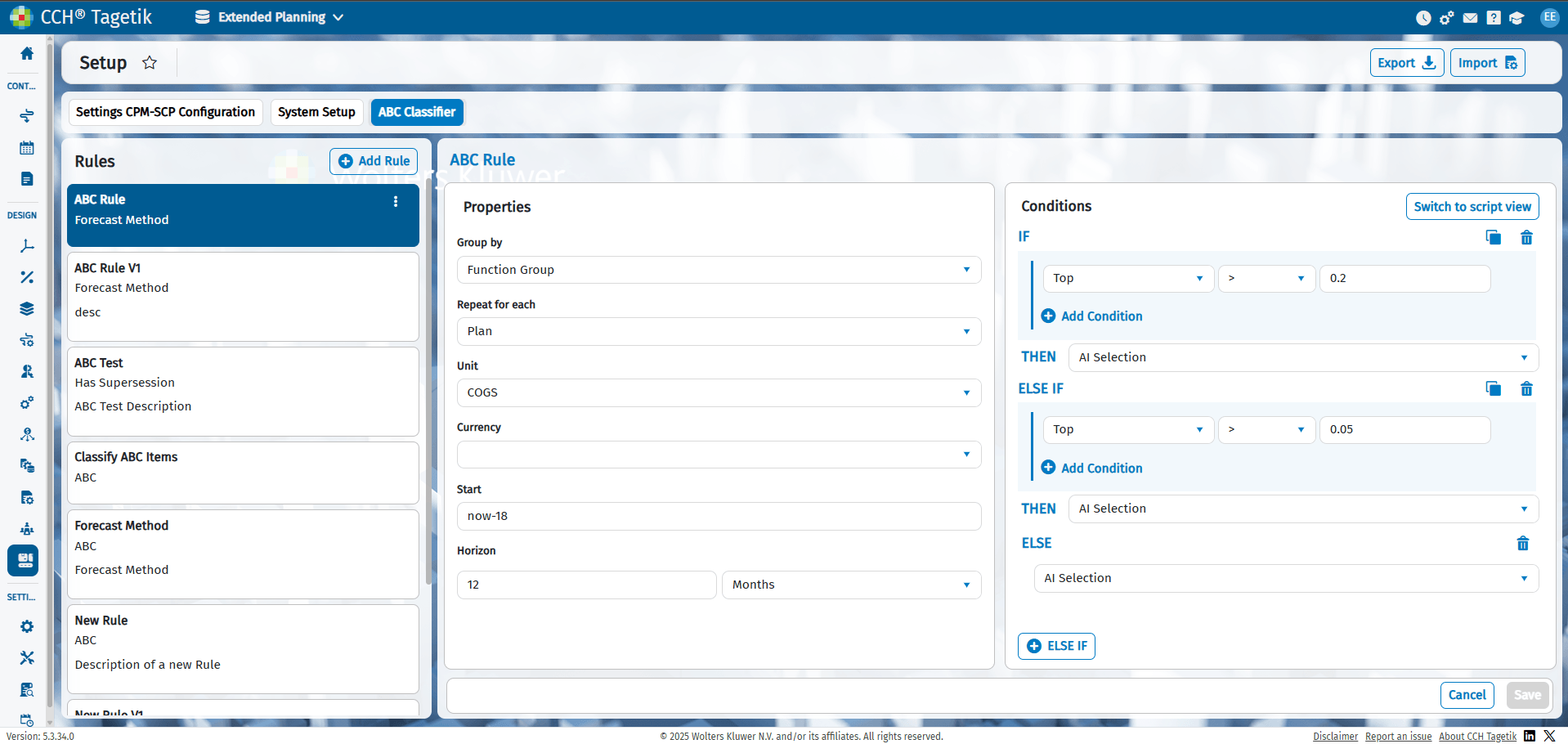
The ABC Classifier settings is accessible by clicking Design > Supply Chain Planning > Setup > ABC Classifier.
ABC Classifier Screen