About the ABC Classification File
You can configure the ABC Classifier through the interface at Design > Supply Chain Planning > Setup > ABC Classifier. The graphical interface allows you to set up the ABC calculation using a simplified configuration screen.
ABC Classifier Screen
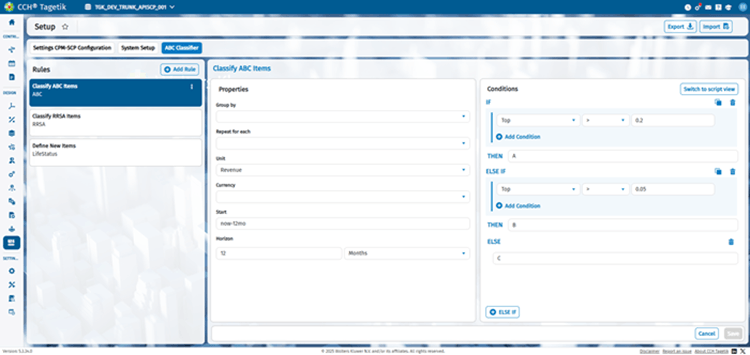
Clicking Switch to script view to modify the ABC Classifier calculation using a script.
ABC Classifier Script Screen
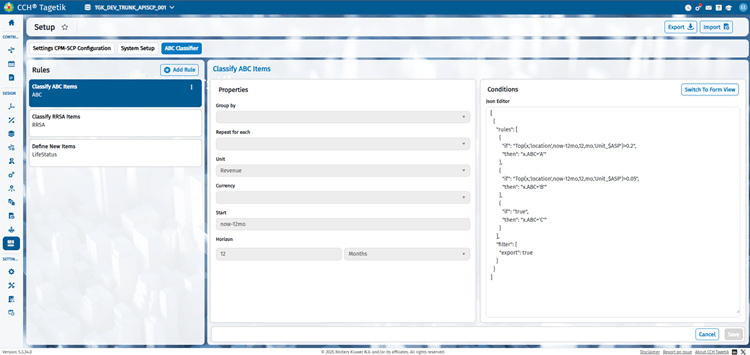
The ABC Classification file is a JSON file that allows you to group your data. A common file looks like this.
{
    "jobs": {
        "Forecast": {
            "tasks": [
                {
                    "filter": {"plan": "sa"},
                    "rules": [
                        {
                            "if": "true",
                            "then": "x.ABC=round(Forecast(x,now,12,mo,'Unit_$ASP','USD'))"
                        }
                    ]
                }
            ]
        },
        "Rank": {
            "tasks": [
                {
                    "filter": {"plan": "Demand"},
                    "rules": [
                        {
                            "if": "true",
                            "then": "x.ABC=''"
                        }
                    ]
                },
                {
                    "filter": {
                        "export": true,
                        "plan": "Demand"
                    },
                    "rules": [
                        {
                            "if": "Rank(x,'name',now,12,mo,'Unit_$ASP')>0.8",
                            "then": "x.ABC='A'"
                        },
                        {
                            "if": "Rank(x,'name',now,12,mo,'Unit_$ASP')>0.5",
                            "then": "x.ABC='B'"
                        },
                        {
                            "if": "true",
                            "then": "x.ABC='C'"
                        }
                    ]
                }
            ]
        },
        "Top": {
            "tasks": [
                {
                    "filter": {"plan": "Demand"},
                    "rules": [
                        {
                            "if": "true",
                            "then": "x.ABC=''"
                        }
                    ]
                },
                {
                    "filter": {
                        "export": true,
                        "plan": "Demand"
                    },
                    "rules": [
                        {
                            "if": "Top(x,'name',now,12,mo,'Unit_$ASP')>0.8",
                            "then": "x.ABC='A'"
                        },
                        {
                            "if": "Top(x,'name',now,12,mo,'Unit_$ASP')>0.5",
                            "then": "x.ABC='B'"
                        },
                        {
                            "if": "true",
                            "then": "x.ABC='C'"
                        }
                    ]
                }
            ]
        }
    },
    "version": 1
}
The Classifier uses a static, provided COGS value and usually the last 12 months of history. To assign values, as shown in the example, it classifies first based on the unit cost of goods. Then, it sorts and calculates the percentage and applies the ABC classification rules provided (>80%=A, >50%=B, and all else is C).
Rank is done through a percentile ranking where the value in the helper function corresponds directly to the percentile value. For example, >0.8 is the top 80th percentile.
The rules shown in the example can be read as follows: Starting from the record with the largest 12-month forecast based on ASP Assign records that are in the top 80th percentile with ABC = “A” Excluding “A” records, assign records in the top 50thpercentile with ABC = “B” Excluding “A” and “B” records, assign the rest of the records with ABC = “C”.
Top uses ABC analysis ranking where the value in the helper function corresponds to one minus the cutoff boundary. For example, >0.2 is the top 80 percent.
The rules shown in the example can be read as follows: Starting from the record with the largest contribution to the overall 12-month forecast of relevant records based on ASP Assign records that are in the top 80% with ABC = “A” Excluding “A” records, assign records in the top 95% (i.e., next 15%) with ABC = “B” Excluding “A” and “B” records, assign the rest of the records with ABC = “C”.
See Format Data for Import into a CCH Tagetik Supply Chain Planning Instance.