Format Data for Import into a CCH Tagetik Supply Chain Planning Instance
The properly formatted data files you initially provided to Wolters Kluwer populate the CCH Tagetik Supply Chain Planning instance.
Import Process
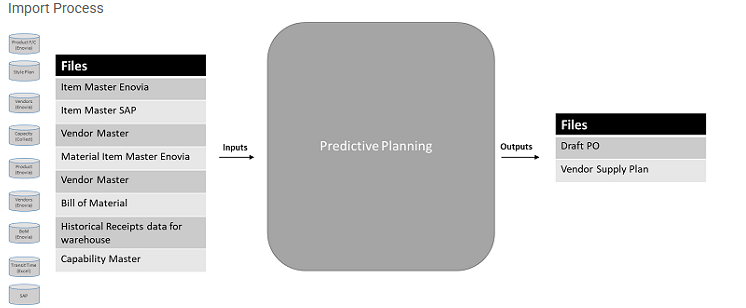
If you need to prepare data manually for import, you must ensure it conforms to the sample data file in your instance. Most imports include at least an Item Master file and a Historical Data file.
Note: There may be cases in which your data does not match an existing file format. In these cases, contact Wolters Kluwer for further discussion (a potential non-standard configuration may be needed).
Wolters Kluwer stores data in an object format, which consists of a key comprised of certain attributes. The data input file (the Item Master) is in a denormalized format, meaning there is repetitive information stored in each record so the system speed is increased. If, each time you opened a record, a search was performed to populate portions of it, system performance would suffer; therefore, each record is an independent entity.
Following are the Wolters Kluwer standard import files.
Import Files
| File | Description | Required |
|---|---|---|
| Item Master | Contains all system-level attributes for each record and any additional attributes for records (customer information, SKUs, and so on). See About the Item Master File. | Y |
| Historical Data | Contains historical data points for records. See About the Historical Data File. | Y |
| BOM | Contains all of the materials, subcomponents, and quantities needed to manufacture an end product. | Y |
| Currencies | Contains the currency used and the exchange rate for the currency. See About the Currencies File. | N |
| Inventory Item Master (Supply Plan only) | Contains inventory-related attributes for the records listed in the Item Master file. See About the Inventory Item Master File. | Y |
| On Order (Supply Plan only) | Lists all items currently ordered from a supplier or manufacturer, but have not arrived at your warehouse yet. See About the On Order File. | Y |
| Supersession file | Contains information on items you are phasing out and replacing with other items. See About the Supersession File. | N |
| ABC Classifier | This file groups items by any stratification rule. See About the ABC Classification File | N |
Automatic Date Formats
The Automatic Date format option supports various date formats:
Automatic Date Format Options
| Date Format | Example |
|---|---|
| dddd, MMMM dd, yyyy | Thursday, June 08, 2000 |
| MMMM dd, yyyy | June 08, 2000 |
| dddd, dd MMMM yyyy | Thursday, 08 June 2000 |
| dd MMMM yyyy | 08 June 2000 |
| M/d/yy | 6/8/00 |
| M/d/yyyy | 6/8/2000 |
| MM/dd/yy | 06/08/00 |
| MM/dd/yyyy | 06/08/2000 |
| yyyy-MM-dd | 2000-06-08 |
| dd-MMM-yy | 08-Jun-00 |