Custom macros
Introduction
In CCH Tagetik, custom macros are an integrated function which, through a series of scripts, allows you to customise or automate certain data entry operations. In particular, Custom Macros allow you to:
- write a VBA macro in an Excel form
- implement custom functions or routines to be run on the occurrence of events defined by the user
This module describes the details of the events that support custom macros and provides a description of the relative syntax.
Supported events
The system supports the following events:
- running a form(TGK_BeforeRun / TGK_AfterRun)
- saving a form (TGK_BeforeSave / TGK_AfterSave)
- updating a form (TGK_BeforeRefresh / TGK_AfterRefresh)
- generating a deployed matrix (TGK_MatrixCreated)
- closing the details window to edit a transactional form (TGK_BeforeFormEditorCommit)
Example of execution after a form has been run
In this example, a subroutine recalled at the end of the form run step is defined (TGK_AfterRun).
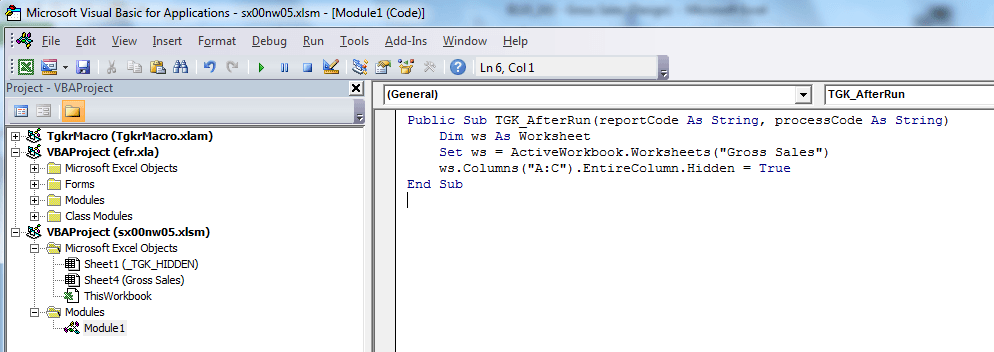
After the form is run, columns, A, B and C are hidden.
Example of execution before a form is saved
In this example, a function recalled before the form is saved (TGK_BeforeRun).
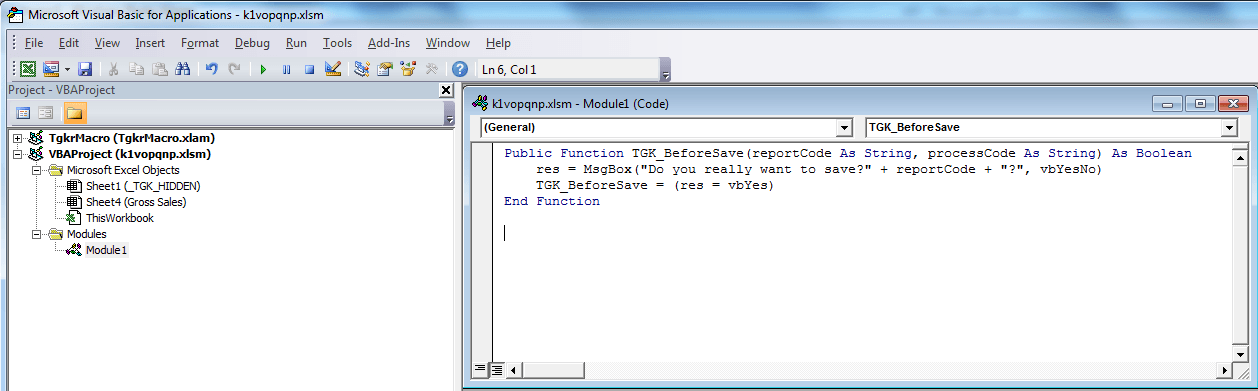
The function returns the following values:
| If... | Then... | AND... |
|---|---|---|
| the user selects Yes | it returns the value TRUE | the system will allow you to save the data. |
| the user selects No | it returns the value FALSE | the system will not allow you to save the data. |
TGK_BeforeRun
| Element | Description |
|---|---|
| Syntax | public function TGK_BeforeRun(reportCode as String, processCode as String, isRefill as Boolean) as Boolean |
| Event description | This event is recalled before a form is run, immediately after the system asks if there are any filters. Note: it is not possible to recall the running of data processing in this event, since data processing from forms can only be run if the form is already open in Data Entry mode. |
| Necessary parameters | - reportCode. Code of the form run (not present in ad hoc forms) - processCode. Code of the current process (empty string if the form is run in Navigation mode) - isRefill.TRUE = next refresh, FALSE = initial run |
| Value returned | - TRUE if the run must proceed. - FALSE if the run must be cancelled. |
TGK_AfterRun
| Element | Description |
|---|---|
| Syntax | public sub TGK_AfterRun(reportCode as String, processCode as String) |
| Event description | This event is recalled at the end of the form run step. With the Handle custom event callbacks with unprotected sheets option active, this routine’s code will be run with Excel spreadsheets temporarily unlocked, but they are locked again once the macro is completed. |
| Necessary parameters | - reportCode. Code of the form run (not present in ad hoc forms) - processCode. Code of the current process (empty string if the form is run in Navigation mode) When the user runs a cycle on all the workbook sheets, the system also considers hidden sheets containing information reserved for the application which may generate data processing errors. The following subroutine can be run to exclude hidden sheets: Sub TGK_AfterRun (reportCode as String, processCode as String) numIndex = 1 columnA = 22 Do While numIndex < WorkSheets.Count if WorkSheets(numIndex).visible = xlSheetVisible WorkSheets(numIndex).Columns(columnA).entireColumn.Hidden = True end if numIndex = numIndex + 1 Loop End Sub |
TGK_BeforeSave
| Element | Description |
|---|---|
| Syntax | public function TGK_BeforeSave(reportCode as String, processCode as String) as boolean |
| Event description | This event is recalled before edited values are saved. With the Handle custom event callbacks with unprotected sheets option active, this routine’s code will be run with Excel spreadsheets temporarily unlocked, but they are locked again once the macro is completed. |
| Necessary parameters | - reportCode. Code of the form the values of which you want to save - processCode. Code of the current process |
| Value returned | - TRUE if the save must proceed. - FALSE if the save must be cancelled. |
TGK_AfterSave
| Element | Description |
|---|---|
| Syntax | public sub TGK_AfterSave(reportCode as String, processCode as String) |
| Event description | This event is recalled after an edited form has been saved. |
| Necessary parameters | - reportCode. Code of the current form - processCode. Code of the current process |
TGK_BeforeRefresh
| Element | Description |
|---|---|
| Syntax | public function TGK_BeforeRefresh(closeWorkbook as Boolean, action as integer) as Boolean |
| Event description | This event is recalled before a form is refreshed. Note: This is not used when a Report List is refreshed. The function is run from the workbook on which the refresh was run. At the end of the update, the workbook can be closed by the macro. With the Handle custom event callbacks with unprotected sheets option active, this routine’s code will be run with Excel spreadsheets temporarily unlocked, but they are locked again once the macro is completed. |
| Necessary parameters | - closeWorkbook. If TRUE at the end of the refresh, the current workbook is closed. - action. Indicates the event after which the refresh is invoked: - 1 = Update requested from Excel using the button. - 2 = Refresh requested using a VBA macro. - 3 = Refresh requested after the form has been saved. - 4 = Refresh requested at the end of data processing. |
| Value returned | - TRUE if the refresh must proceed. - FALSE if the refresh must be cancelled. |
TGK_AfterRefresh
| Element | Description |
|---|---|
| Syntax | public function TGK_AfterRefresh(formCode as String, processCode as String) as Boolean |
| Description | This event is recalled after a form is refreshed. Note: This is not used when a Report List is refreshed. The function is run from the workbook on which the refresh was run. At the end of the refresh, the workbook can be closed from the refresh action. With the Handle custom event callbacks with unprotected sheets option active, this routine’s code will be run with Excel spreadsheets temporarily unlocked, but they are locked again once the macro is completed. |
| Necessary parameters | - formCode. This identifies the form on which the refresh was run. - processCode. This identifies the process, or an empty string if the form was run in Navigation mode. |
TGK_MatrixCreated
| Element | Description |
|---|---|
| Syntax | public sub TGK_MatrixCreated(reportCode as String, matrixCode as string, matrixAddress as string) |
| Description | This event is called up at the end of the deployment of a dynamic matrix. In this event, it is not possible to refer to output sheets or matrices that have not yet been generated by the system. |
| Necessary parameters | - reportCode. Code of the form run (not present in ad hoc forms) - matrixCode. Code of the matrix just created - matrixAddress. Address of the range occupied by the matrix just created |
TGK_BeforeFormEditorCommit
| Element | Description |
|---|---|
| Syntax | public function TGK_BeforeFormEditorCommit(values() As Variant, rowIndex As Integer) as Boolean |
| Description | This event is recalled by clicking on the OK button shown in the record details window of a transactional form editor (Transactional data entry details window). |
| Necessary parameters | - values. Set of values present in the current row of the transactional form when the OK button is clicked. - rowIndex. (Logical) index of the current row |
| Value returned | - TRUE: the details window closes and the new values inserted remain in the matrix. - FALSE: the original values present when the details window was opened are restored. |