The TGKCALCSET function
Description
The TGKCALCSET function allows you to improve performance in the presence of forms containing several custom functions. In particular, it allows you to group functions into calculation sets and set specific attributes for those sets.
Syntax
The function uses the following syntax: =TGKCALCSET(range, [hints])
Arguments
The items that can be added to the function are detailed below.
Calculation sets
Calculation sets are made up of the following arguments:
- range, which indicates the range of cells belonging to the set.
- hints (optional), which specifies whether to apply a hint to the calculation set query, and if so, what type of hint to apply
Hints
The possible values are:
| Element | Description |
|---|---|
| - E - ENABLED - |
Enables the use of hints. |
| - D - DATA | Indicates that the use of hints is based on the content of the data tables, optimising the running of the form. |
| - NO - DISABLE | Disables the use of hints. |
| - A - AUTO | Automatically activates/deactivates the use of hints. |
Example
In this example, several TGKRETF functions are present, including the entity, scenario and period dimensions.
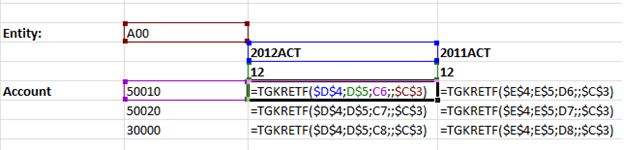
The formulas contain several shared dimensions, such as entity, scenario and period. Separate queries must be run for each cell, and this can have an impact on performance. To optimise the running of forms, therefore, it is possible to define a calculation set that groups linked elements.
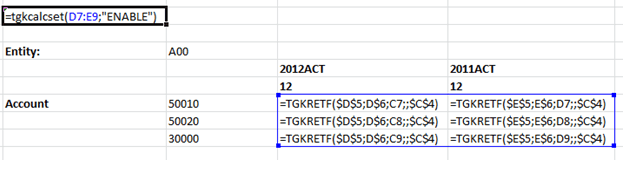
The result of the functions is as follows.
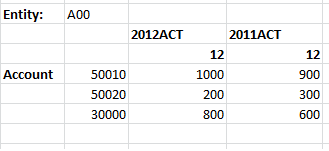
In general, it is advisable to define a TGKCALSET on cells defined via the same dimensions and/or hierarchies, trying – if possible – to identify "rectangular areas" in which to position the formula so that only one filter changes when they are shifted horizontally or vertically. In general, the more a set of cells to be grouped "is like a matrix", the more likely the user is to benefit from grouping them in a single "calculation set".