Styles window - Styles to use tab
Excel > CCH® Tagetik >  Tagetik style >
  Definition > Style to use tab
Purpose of window
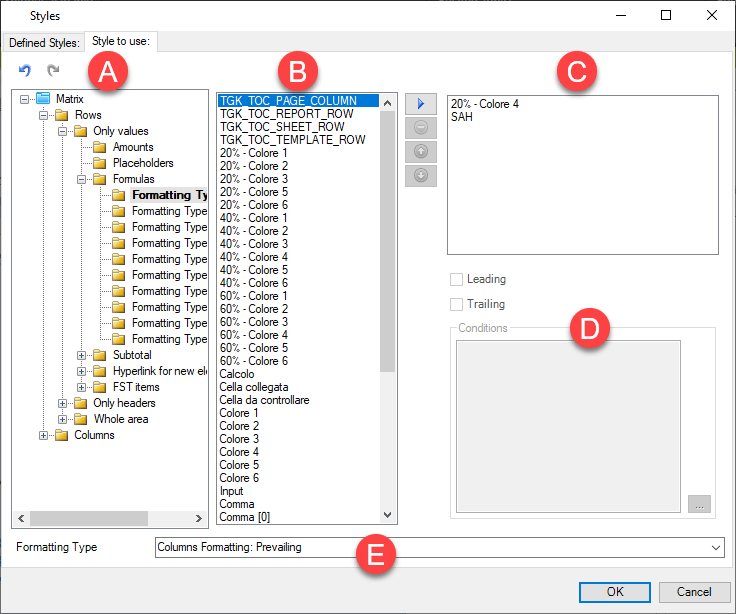
This window allows you to define the style to be used for every section of the matrix of the open form.
What it looks like
| Element | Description |
|---|---|
| A | Hierarchy of matrix elements on which to define styles Note: the elements with which a style is already associated are shown in bold. |
| B | List of available default styles |
| C | List of styles associated with a section of the matrix. Note: the order in which the styles are displayed corresponds to the order in which they are applied at runtime. |
| D | Definition area for any conditional formatting |
| E | Prevailing formatting type selection |
Buttons and fields in the window
| Element | Description |
|---|---|
| Relates the selected style to the selected matrix element. | |
| Removes the style/matrix element relationship. | |
| Moves the selected style up. | |
| Moves the selected style down. | |
| Leading | Allows you to apply the style only to the first row/column of a matrix. |
| Trailing | Allows you to apply the style only to the last row/column of a matrix. |
Prevailing formatting type
| Element | Description |
|---|---|
| Rows Formatting: Prevailing | If several styles are defined on rows and columns for the same sections, the style set on the row will prevail. |
| Columns Formatting: Prevailing | If several styles are defined on rows and columns for the same sections, the style set on the column will prevail. |